A client doesn't need every column from Ads Manager. They need four answers: how much was spent, what it bought, whether that is better or worse than before, and what you will do next. This guide covers what to put in a monthly Meta ads report, the numbers that are easiest to get wrong, and how to explain a change in plain words.
The four questions every report must answer
- How much did we spend? The amount spent in the period, in the ad account's currency.
- What did it buy? The results for each goal (messages, purchases, leads) with the cost of each.
- Is it better or worse than before? A comparison with the previous period of the same length.
- What happens next? Two or three concrete actions for the coming month.
If a section of your report doesn't help answer one of these, it belongs in an appendix, or nowhere.
Report results per goal, never as one total
In Ads Manager, Results is the number of times your ads achieved an outcome, based on the objective and settings you chose (Meta). The outcome is set on each ad set: its performance goal tells Meta's delivery system which result to get as efficiently as possible (Meta). A Messages campaign counts conversations, a Sales campaign counts purchases, a Leads campaign counts leads.
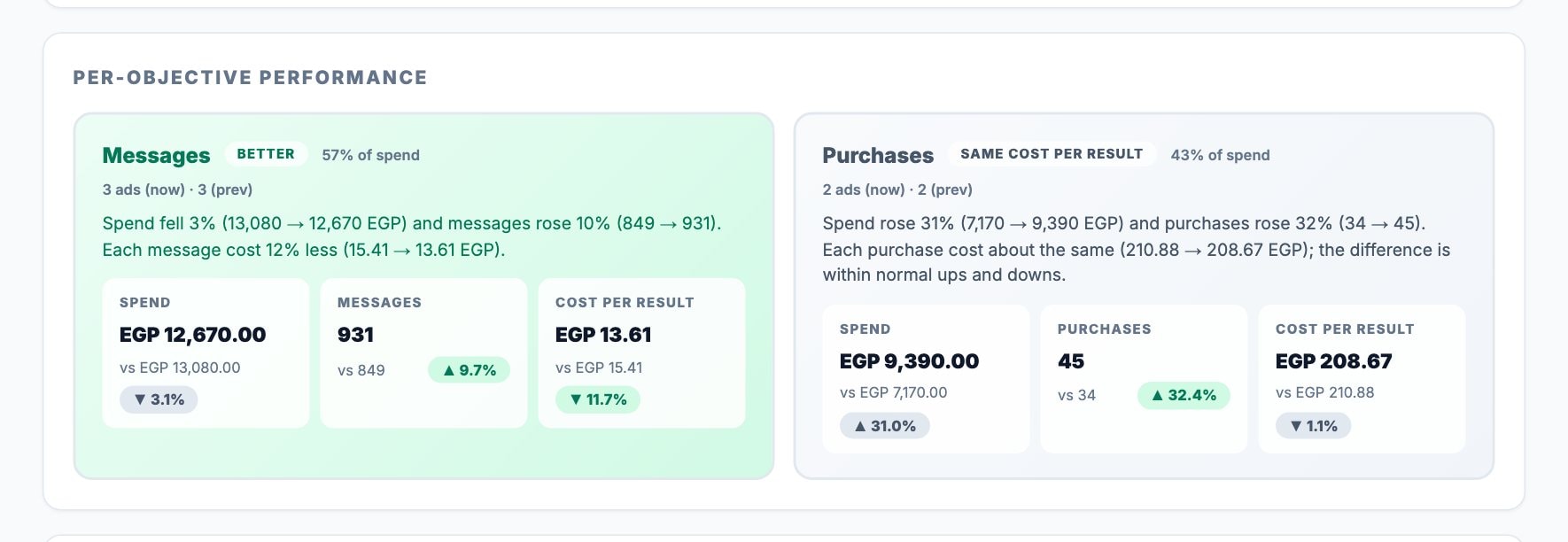
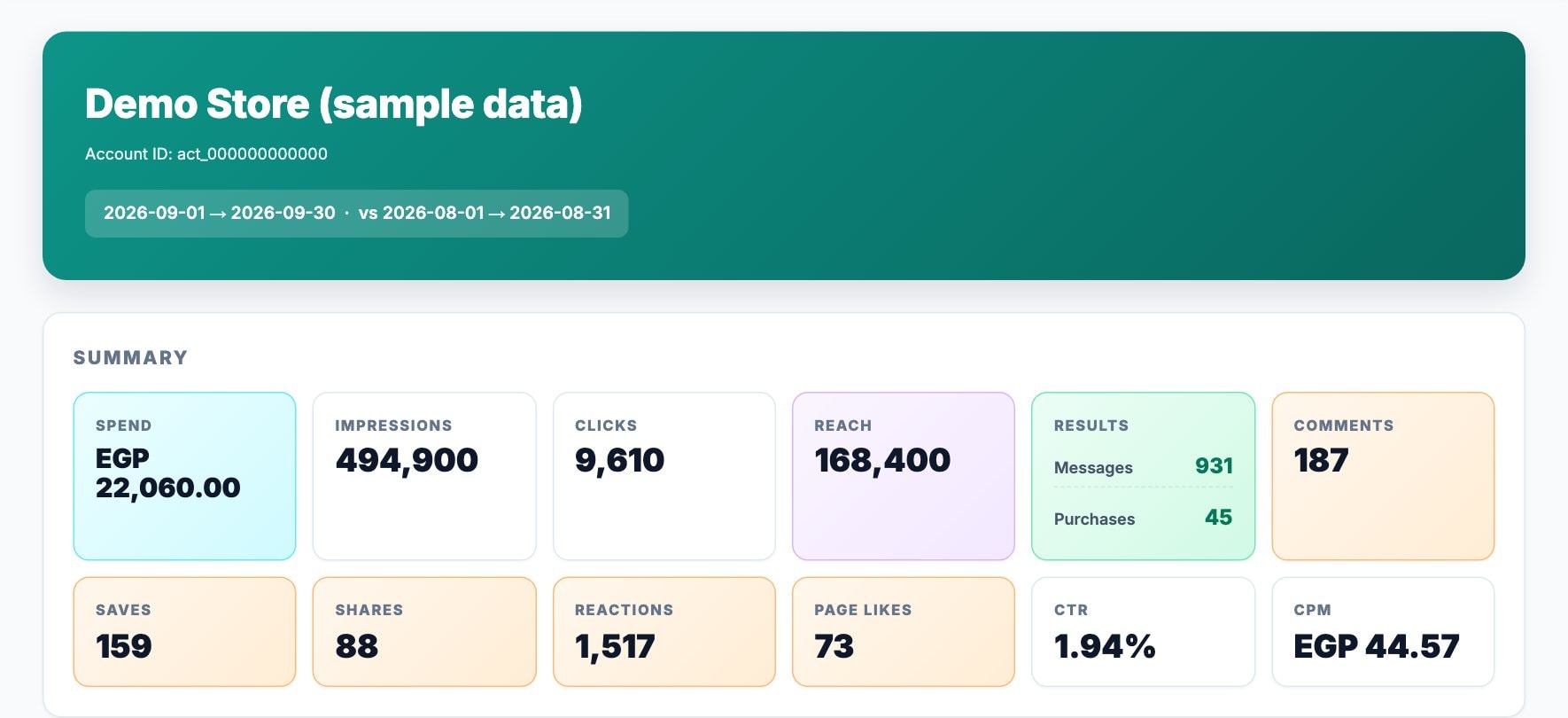
Those are different things, so they can't be added together. 931 messages and 45 purchases are not "976 results", and a cost per result worked out from that total describes nothing real. Give each goal its own line, with its own count and its own cost per result.
The numbers that belong in every report
| Metric | What it means | What it tells the client |
|---|---|---|
| Amount spent | What the ads cost in the period | The budget actually used |
| Results | Outcomes counted for each goal | What the money bought |
| Cost per result | Amount spent ÷ results | Whether each result got cheaper or more expensive |
| Reach | People who saw the ads at least once (an estimate) | How many people the message reached |
| Impressions | How many times the ads were shown | The volume of exposure |
| Frequency | Impressions ÷ reach | How often the same people saw the ads |
| CTR | Clicks as a share of impressions | Whether the ads caught attention |
| CPM | The cost of 1,000 impressions | What attention cost in the auction |
Cost per result is the number most clients care about once they understand it. Meta calculates it as the amount spent divided by the number of results (Meta). Read it per goal: a cost per message and a cost per purchase are different prices, and one is not "better" than the other. Every metric here is defined in the glossary.
Reach doesn't add up, and that's correct
Reach counts people, not views, and Meta removes the duplicates: someone who saw two of your ads is one person reached. Suppose one ad set reached Amira and Bassem, and a second reached Bassem and Karim. Each ad set reports a reach of two, but the campaign reached three people, because Bassem is counted once (Meta). Reach is also an estimate: Meta calculates metrics that count people from sampled data (Meta), which is why small differences between levels are normal.
So never total the Reach column of an export. Use the reach Meta reports for the whole campaign or account over the same dates. The gap is not small: on real accounts we have checked, Meta's de-duplicated reach was about 28% lower than the sum of the individual ads, and 5% to 11% lower than the sum of the campaigns. Reach vs impressions goes into the details.
Frequency is your early warning
Frequency is the average number of times each person saw your ads (Meta). There is no universal right number: Meta notes it may average one to two per ad set, or be much higher, depending on budget, audience size and schedule. What matters is the trend. If frequency keeps rising while results fall or cost per result climbs, the same people are seeing the same ads too often, and it's time to refresh the creative or widen the audience.
Compare like with like
- Same length, previous period. Compare September with August, or the last 30 days with the 30 days before them. If the two periods differ in length, compare daily averages.
- Leave today out. A day that isn't over always looks worse than a full one.
- Recent days can still change. Meta credits an action, such as a purchase, to your ad when it happens within a set number of days after someone clicked or viewed it; that window is the attribution setting (Meta). Results for the last few days can still come in after you send the report, so note when it was made.
- Small numbers swing. Going from 4 to 6 purchases is +50%, and it may mean nothing. Judge cost per result only when each period has enough results to be stable.
The full method is in how to compare two periods.
Explain what changed, not just what moved
A table of percentages leaves the client to do the analysis. Write one or two sentences that say what happened and why.
Most changes come from four places:
- Budget. More spend usually buys more results. The question is what the extra results cost.
- Efficiency. Did each result get cheaper or more expensive?
- Mix. If budget moved from one goal to another, the totals move even when nothing improved.
- Creative and audience. Rising frequency with a falling CTR points to tired ads.
When the month is worse, explaining it well matters as much as the numbers.

Write it for the person reading it
- Open with a summary of three or four sentences. Many clients read nothing else.
- Use the client's language. An Arabic-speaking business owner should get an Arabic report, not a translated spreadsheet; see writing reports in Arabic.
- Use campaign and ad names the client recognises, and keep internal codes out of the summary.
- End with two or three next steps, each tied to a number in the report.
A monthly report structure that works
- Summary: what was spent, what it bought, whether it's better or worse, and why.
- Results by goal, with cost per result.
- Comparison with the previous month.
- What drove the change.
- The ads that improved and declined the most.
- Next month's plan.
How Adams Analytics builds this report
Adams Analytics connects to your Meta ad accounts and builds this report from Meta's own numbers: results for each goal, a comparison with the previous period that shows each goal's cost per result and explains the change in plain words, and the ads that moved the most. You add your logo and your client's, open the report in your browser and save it as a PDF, in Arabic or English. See how it works or compare plans.
Questions
What should a monthly Meta ads report include?
The amount spent, the results for each goal with their cost per result, reach and frequency, a comparison with the previous month, what drove the change, the ads that improved and declined most, and two or three next steps.
Can I add up results from different campaigns?
Only when they count the same thing. Messages, purchases and leads are different results, so report each goal separately with its own cost per result.
Why doesn’t the reach of my ads add up to the campaign’s reach?
Reach counts people, and someone who saw more than one ad is counted once at the campaign level. Use the reach Meta reports for the campaign or account instead of adding up ads.
Why did last week’s results change after I sent the report?
Meta credits a result to an ad when it happens within the ad set’s attribution window after a click or view, so results for recent days can still arrive later. Note when each report was made.
What is a good frequency for Meta ads?
There is no single number; it depends on budget, audience size and schedule. Watch the trend: frequency rising while results fall is a sign the audience has seen the ads too often.
Sources
- Meta Business Help Center — Results
- Meta Business Help Center — About performance goals
- Meta Business Help Center — Cost per result
- Meta Business Help Center — Troubleshoot reasons why ad metrics may not add up
- Meta Business Help Center — About estimated, in-development and third-party metrics
- Meta Business Help Center — Frequency
- Meta Business Help Center — About attribution setting
Send your next client report in minutes
Adams Analytics connects to your Meta ad accounts and builds branded PDF reports in English or Arabic. Free for 7 days — no credit card.
Start free trialWritten by the Adams Analytics team and checked against Meta’s documentation and our own product. Spotted something out of date? Tell us at support@buildincairo.com.