"Is this month better than last month?" is the question every client asks, and a percentage table is the easiest way to answer it badly. Totals move with the budget, short periods swing on chance, and the last few days are still filling in. This is a method for comparing two periods that holds up when the client asks "why?".
Choose the right two periods
- Same length, back to back. September against August, or the last 7 days against the 7 days before them.
- Same season for seasonal businesses. Compare with the same weeks last year, and remember that Ramadan moves about 11 days earlier every year, so "March against March" may not be "Ramadan against Ramadan".
- Newer period first. Decide which period is "now" before you write anything; it is easy to read a comparison backwards when the dates are entered the other way round.
Make them comparable
- Leave today out. A day that isn't over always looks worse than a full one.
- Use daily averages when the lengths differ. 31 days against 30 is close enough to compare totals; 10 days against 30 is not.
- Let recent days settle. Meta credits a purchase or lead to your ad if it happens within the attribution window after a click or view (Meta), so the newest days keep collecting results. Comparing a period that ended yesterday with one that ended a month ago slightly favours the older one.
Judge cost per result, goal by goal
Totals mostly follow the budget: spend more and you usually get more results. What tells you whether performance changed is the cost per result, which Meta calculates as the amount spent divided by the number of results (Meta).
Compare it goal by goal. If messages got cheaper and purchases got more expensive, those are two separate findings. Added together, they cancel out into one number that describes neither.
When the budget changed, look at what the extra results cost
When spend goes up, the average cost per result hides the most useful number: what the additional results cost.
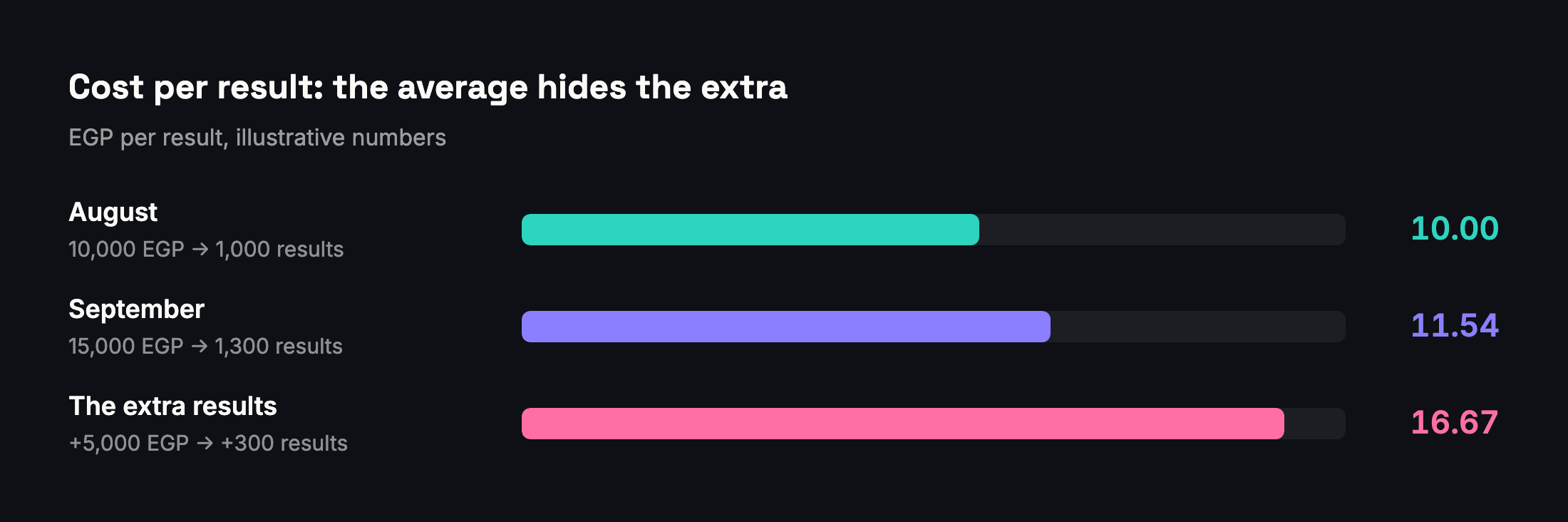
In this example, the average cost per result rose from 10.00 to 11.54 EGP, which looks like a modest change. But the extra 5,000 EGP bought 300 extra results at 16.67 EGP each. That is the number to put in front of a client deciding whether to keep the higher budget.
Is the difference real?
Small numbers swing by chance. Going from 4 purchases to 6 is +50% and may mean nothing at all. As a rule of thumb, don't call a change in cost per result until each period has at least 20 results and the difference is bigger than the usual week-to-week ups and downs. "Too early to judge" is a valid conclusion, and an honest one.
Check what changed in the account
Before explaining a difference, list what changed between the two periods:
- Edits. Pausing an ad set or changing its optimization event, audience or creative is a significant edit that can restart the learning phase; large budget or bid changes can too (Meta). Results are usually less stable while an ad set is learning (Meta).
- New and stopped ads. A new ad has no "before"; a stopped ad has no "after". Report them separately from the ads that ran in both periods.
- Budget moved between goals. If money moved from messages to sales, the totals change even when neither goal performed differently.
Write the comparison as a sentence
How Adams Analytics compares periods
Every plan in Adams Analytics includes period comparison. It puts the two periods in date order, compares daily averages when their lengths differ by more than 15%, and judges cost per result goal by goal, calling a change only when each period has at least 20 results and the difference is bigger than normal ups and downs. Each goal gets a plain-language tag (Better, Worse, Bigger but pricier, Smaller but cheaper, Same cost per result, or Too early to judge), and when budget and results move together it states what the extra results cost. See how it works.
Questions
Which period should I compare this month with?
The previous period of the same length, such as September against August. For seasonal businesses, also compare with the same weeks last year, keeping in mind that Ramadan moves about 11 days earlier every year.
What if the two periods have different lengths?
Compare daily averages instead of totals. A 10-day period will almost always have fewer results than a 30-day one.
Should I include today in a comparison?
No. A day that isn’t over always looks worse than a full day, so end the newer period yesterday.
Why judge cost per result rather than total results?
Total results mostly follow the budget. Cost per result shows whether each result got cheaper or more expensive, which is the performance question.
How many results do I need before calling a change?
As a rule of thumb, at least 20 results in each period, and a difference bigger than the usual week-to-week ups and downs. Below that, say it is too early to judge.
Sources
Send your next client report in minutes
Adams Analytics connects to your Meta ad accounts and builds branded PDF reports in English or Arabic. Free for 7 days — no credit card.
Start free trialWritten by the Adams Analytics team and checked against Meta’s documentation and our own product. Spotted something out of date? Tell us at support@buildincairo.com.