This glossary covers the Meta ads metrics that show up in client reports. For each one: what it measures, in Meta's own definition; the name Meta uses for it in Arabic, so you can find it when Ads Manager or a client works in Arabic; and the mistake to avoid when you report it.
Spend and delivery
Amount spent (المبلغ الذي تم إنفاقه)
The estimated total amount of money spent on a campaign, ad set or ad during its schedule (Meta). Watch out: it is an estimate of spend, not an invoice; billing can differ in timing.
Impressions (مرات الظهور)
The number of times your ads were on screen (Meta). Watch out: one person can produce many impressions; it is not a count of people.
Reach (الوصول)
The number of people who saw your ads at least once (Meta). It is an estimate. Watch out: never add reach up across ads, campaigns or days; the same person would be counted more than once.
Frequency (معدل التكرار)
The average number of times each person saw your ads: impressions divided by reach (Meta). Watch out: if frequency rises while results fall, the audience may be tired of the ads.
CPM — cost per 1,000 impressions (التكلفة لكل ألف ظهور)
The average cost of 1,000 impressions: amount spent divided by impressions, times 1,000 (Meta). Watch out: a higher CPM means attention cost more; it says nothing about whether the ads worked.
Results and cost
Results (النتائج)
The number of times your ads achieved the outcome they were set up for, based on the objective and settings you chose (Meta). Watch out: results of different goals are different things; report messages, purchases and leads separately.
Cost per result (التكلفة لكل نتيجة)
The average cost per result: amount spent divided by results (Meta). Watch out: compare it within one goal; a cost per message and a cost per purchase are different prices.
Clicks
Clicks (all) (النقرات (الكل))
Clicks of every kind on your ads: link clicks, but also clicks on the Page name or picture, reactions, comments, shares and opening media full screen (Meta). Watch out: it is much larger than the clicks that went to your website.
Link clicks (النقرات على الرابط)
Clicks on links in the ad that led to destinations or experiences, on or off Meta's apps (Meta). Watch out: a link click is not a visit; some people leave before the page loads.
CTR — link click-through rate (نسبة النقر إلى الظهور للرابط)
The share of impressions that led to a link click: link clicks divided by impressions (Meta). Watch out: say which CTR you report; a CTR based on all clicks is always higher.
CPC — cost per link click (التكلفة لكل نقرة على رابط)
The average cost of each link click (Meta). Watch out: cheap clicks are only good if they lead to the result you want.
Engagement and video
Post engagement (التفاعل مع المنشور)
The total number of actions people take involving your ads (Meta). Watch out: it mixes very different actions; for most business goals it is a supporting number, not the result.
ThruPlay (ThruPlay)
The number of times a video was played to completion, or for at least 15 seconds (Meta). Watch out: a ThruPlay is not a person; one viewer can produce several.
Messaging and sales
Messaging conversations started (بدء محادثات المراسلات)
The number of times people started messaging your business after at least 7 days without messages, attributed to your ads (Meta). Watch out: a conversation is not a sale; orders from chat live in the business's records.
Purchase ROAS (عائد الإنفاق الإعلاني لعمليات الشراء)
The return on ad spend from purchases attributed to your ads: purchase conversion value divided by amount spent (Meta). Watch out: it is based on the purchase value your website sends, not on profit.
Settings that change the numbers
Attribution setting (إعداد الإسناد)
The number of days after a click or view within which Meta credits a conversion to your ad (Meta). Watch out: two ad sets with different settings count purchases differently; check before you add them up.
Performance goal (هدف الأداء)
What you tell Meta's delivery system to get as efficiently as possible for an ad set (Meta). Watch out: it decides what the ad set's results are, so check it before comparing ad sets.
Learning phase (مرحلة التعلم)
The period after an ad set starts or is significantly edited, while the delivery system learns (Meta). Watch out: results are usually less stable during learning; don't judge a change too early.
How Adams Analytics uses these metrics
Adams Analytics reports these metrics the way Meta defines them: results per goal with their own cost, reach as Meta's de-duplicated figure on the Account Detail and Account Summary screens, and the Account Detail report available in Arabic or English. See how it works.
Questions
What is the difference between clicks (all) and link clicks?
Clicks (all) counts every click on the ad, including reactions, comments, shares and clicks on the Page name. Link clicks counts only clicks on links that led to a destination, such as your website.
What is the Arabic for reach and impressions in Meta ads?
Meta uses الوصول for reach and مرات الظهور for impressions. Reach counts people; impressions count how many times the ads were on screen.
Which Meta ads metrics can be added up?
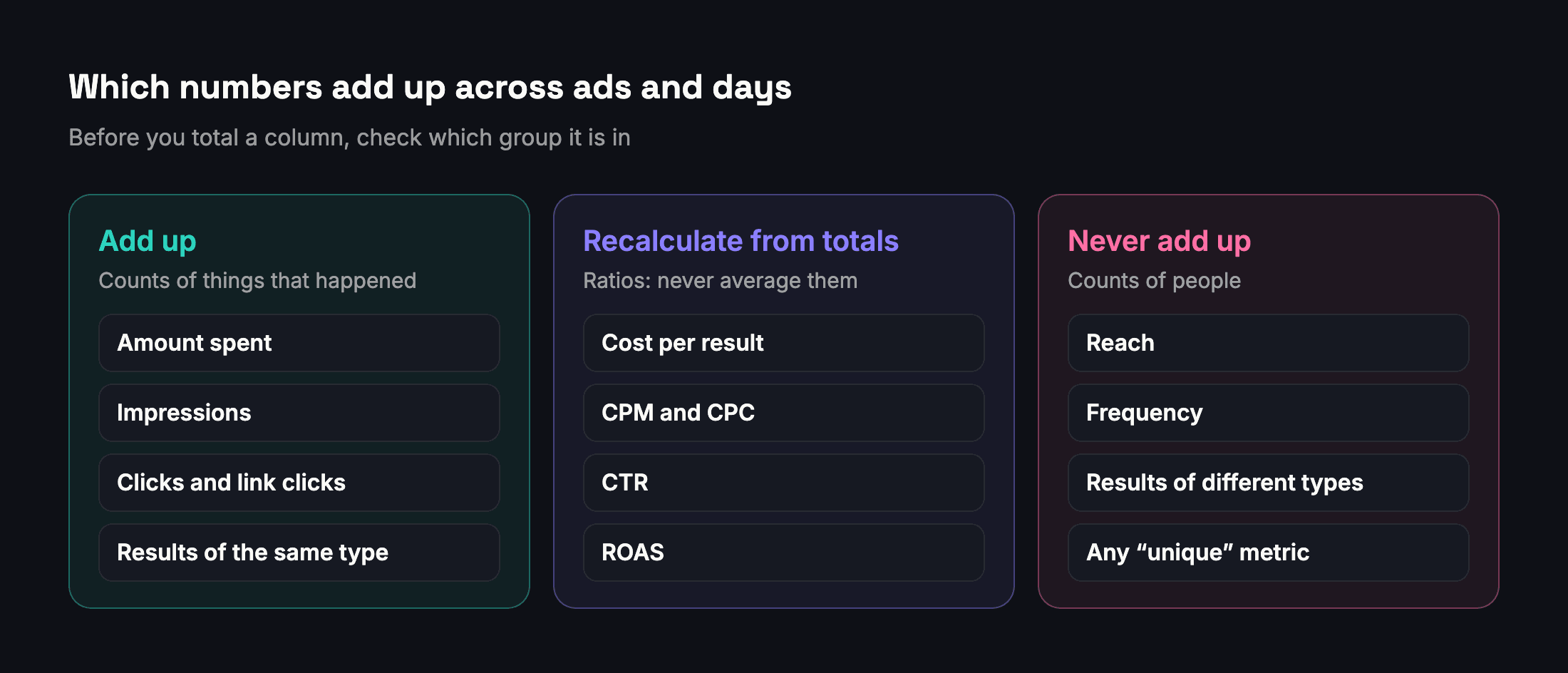
Counts of things that happened: amount spent, impressions, clicks, and results of the same type. Ratios such as cost per result, CPM and CTR should be recalculated from totals, and people counts such as reach should never be added up.
Is cost per result the same as cost per purchase?
Only for ad sets whose result is purchases. Cost per result is the amount spent divided by the results of each ad set’s own goal, which may be messages, leads or purchases.
What is a ThruPlay?
A video play that reached the end of the video or lasted at least 15 seconds. It counts plays, not people.
Sources
- Meta Business Help Center — Amount spent
- Meta Business Help Center — Impressions
- Meta Business Help Center — About reach metrics
- Meta Business Help Center — Frequency
- Meta Business Help Center — Results
- Meta Business Help Center — Cost per result
- Meta Business Help Center — CPM (cost per 1,000 impressions)
- Meta Business Help Center — Clicks (all)
- Meta Business Help Center — Metrics for call-to-action ads (link clicks)
- Meta Business Help Center — CTR (link click-through rate)
- Meta Business Help Center — CPC (cost per link click)
- Meta Business Help Center — Post engagement
- Meta Business Help Center — About ThruPlay
- Meta Business Help Center — Messaging conversations started
- Meta Business Help Center — Purchases ROAS
- Meta Business Help Center — About attribution setting
- Meta Business Help Center — About performance goals
- Meta Business Help Center — About the learning phase
Send your next client report in minutes
Adams Analytics connects to your Meta ad accounts and builds branded PDF reports in English or Arabic. Free for 7 days — no credit card.
Start free trialWritten by the Adams Analytics team and checked against Meta’s documentation and our own product. Spotted something out of date? Tell us at support@buildincairo.com.