Every Monday, media buyers repeat the same routine. Open Ads Manager, pick an account, set the dates, export, compare with last week, write the summary, send it to the client, then do it all again for the next account. Agencies with fifteen clients do it fifteen times.
In our article on what horses and cars teach us about AI, we argued that the opportunity in AI is not to do old work a little faster. It is to do work that was not possible before. A dashboard answers the questions its designer expected. A conversation answers the question you actually have right now: why did messages get more expensive in the second week, which client will run out of prepaid balance before Thursday, and can you write this month's review in Arabic for the client?
That is what we are building: a way to ask Adams Analytics those questions from inside Claude, the AI assistant made by Anthropic, and get answers built on the right numbers.
What is changing: from dashboards to questions
Reporting tools, including ours, are built around screens. You translate your question into filters, a date range and a level (campaign, ad set or ad), read the result, and translate it back into an answer. For one account this takes minutes. For a portfolio of clients it takes the morning.
What changed is that AI assistants can now use tools. An assistant like Claude no longer has to guess your numbers from memory or from a screenshot you pasted. It can call a tool that fetches the numbers, read the answer, and explain it. The standard that makes this work is called MCP, the Model Context Protocol. Anthropic introduced it in November 2024, and it has since been adopted by ChatGPT, Cursor, Gemini, Microsoft Copilot and Visual Studio Code.
But an assistant is only as good as the data its tools hand it. If a tool returns raw rows for every ad, the assistant has to do the maths itself, and that is where things go wrong. It can add up reach across ads and count the same person twice. It can add messages to link clicks and call the total "results". It can call a 10% change "worse" when it is normal day-to-day noise. Claude writes fluent, confident sentences, so a wrong number arrives looking exactly like a right one.
So our design rule is simple: Adams Analytics computes, Claude explains. Every tool in the connector will return numbers that Adams Analytics has already worked out, the same way it works them out for your dashboard and your client reports. Claude's job is to pick the right tool, read the answer, and explain it in your language.
What MCP is, in one minute
The official MCP documentation puts it this way: "Think of MCP like a USB-C port for AI applications." Before USB-C, every device needed its own cable. Before MCP, every AI assistant needed its own custom integration for every service. With one standard, a service builds one connector and it can work in any assistant that supports MCP.
An MCP server, which Anthropic calls a connector, offers a set of tools. Each tool has a name, a short description and the inputs it needs, for example "compare two periods for this ad account". When you ask a question, Claude reads the descriptions, decides which tool can answer it, calls it, and gets the result back inside the conversation. You see which tool it called, and you can control which tools it may use.
Connectors come in two kinds. A local connector runs on your own computer and is mostly for developers. A remote connector runs on the web, and you add it to Claude with a link. Ours will be remote, so there is nothing to install. You will sign in through the standard OAuth flow, on our own sign-in page, so Claude never sees your password.
For the longer story of MCP, Meta's own connector and the safety rules that apply to any of them, read our complete guide to Meta ads in Claude.
How setting it up will work
We designed the setup around the way Claude already handles custom connectors, so it should take about a minute.
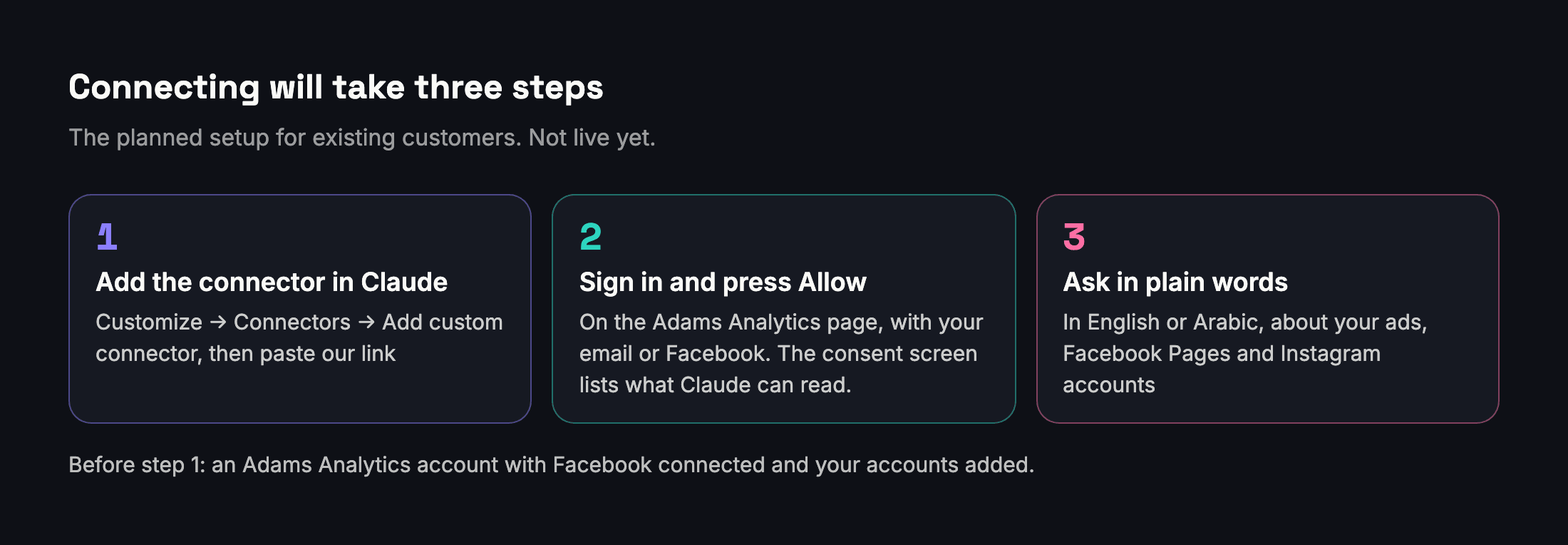
- Add the connector in Claude. In Claude, open Customize, then Connectors, press the plus button and choose "Add custom connector". Give it a name, paste the link we will publish on our setup page at launch, follow the prompts and press Add. After we are listed in Claude's Connectors Directory, you will be able to find us by name instead.
- Sign in and press Allow. Press Connect, and Claude opens the Adams Analytics sign-in page in a new window. You sign in the way you always do, with your email or with Facebook. A consent screen then shows that Claude is asking for access and lists what it will be able to read. You press Allow, and the window closes.
- Ask in plain words. In any chat, press the plus button, open Connectors and switch Adams Analytics on. Then ask your question in English or Arabic.
That is the whole flow for an existing customer. To be precise about what has to be true first:
- You need an Adams Analytics account with Facebook connected and the ad accounts, Facebook Pages and Instagram accounts you want Claude to see already added. If you are new, that is a few extra minutes in Adams Analytics before the three steps.
- You need a Claude account. Anthropic offers custom connectors on every Claude plan, including Free, but the Free plan is limited to one custom connector. If you already use another custom connector on Free, such as Meta's own, you will have to choose between them.
- On Claude Team and Enterprise, an organization Owner adds the connector first in the organization settings. Members then open Connectors and press Connect to sign in.
- On your phone, add the connector once on the web or in the desktop app. Anthropic's documentation says remote connectors then work across Claude's apps, including mobile.
- In Claude Code, developers will be able to add it with one command,
claude mcp add --transport http adams-analyticsfollowed by the link, and then sign in with/mcp.
What you will be able to ask
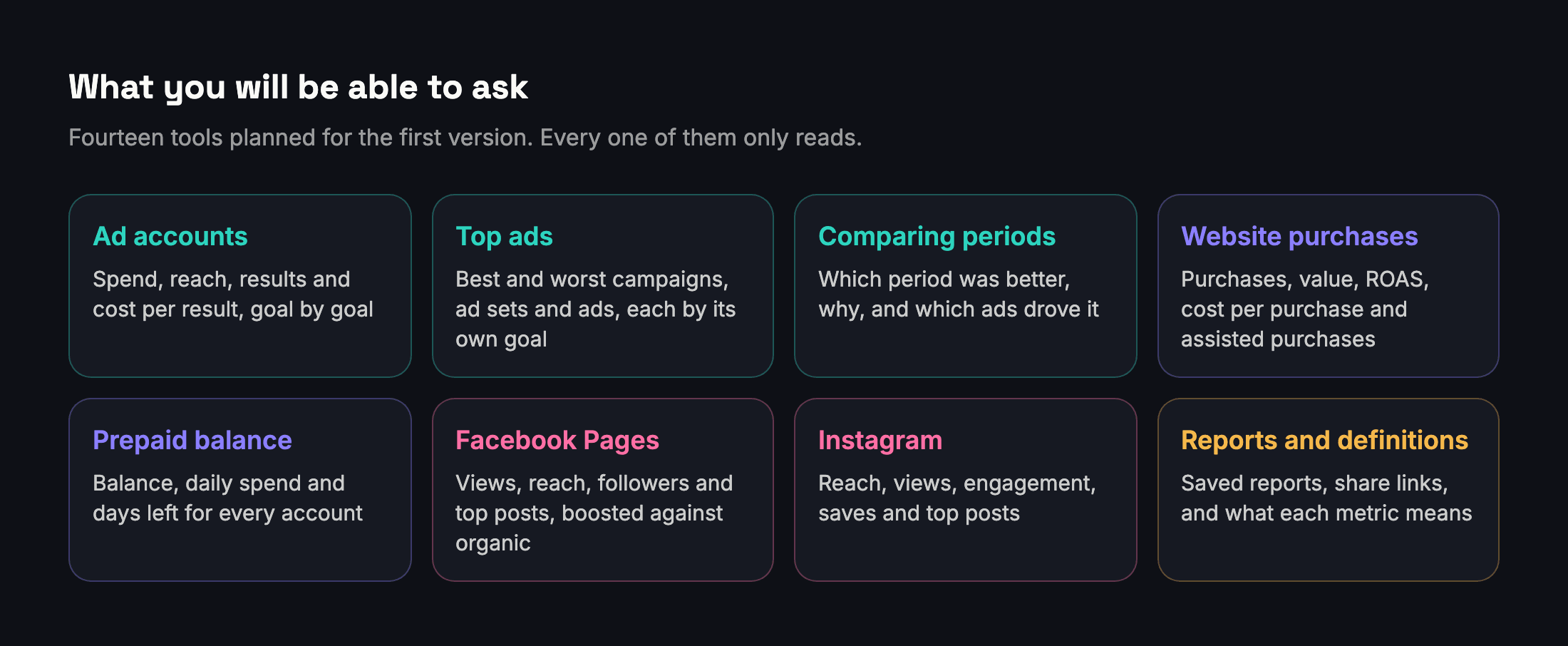
The first version is planned to have fourteen tools, each answering one clear question and each reusing code that already runs in Adams Analytics. You will never need to know their names, because Claude picks them for you. Here is what they cover, in plain words.
| Area | What you can ask | An example |
|---|---|---|
| Ad accounts | Which accounts Claude can see, and each account's spend, reach, results and cost per result, goal by goal | "How did Demo Store do last week?" |
| Top ads | The best and worst campaigns, ad sets or ads, each judged by its own goal | "Which three ads brought the cheapest messages in September?" |
| Comparing periods | Which period was better, why, and which ads drove the change | "Was October better than September for Client B, and why?" |
| Website purchases | Purchases, purchase value, ROAS, cost per purchase, the funnel and assisted purchases | "How many website purchases did the summer campaign bring, and at what cost?" |
| Prepaid balance | Balance, daily spend and days left for every account | "Which accounts will run out of balance this week?" |
| Facebook Pages | Views, reach, followers, top posts, and boosted against organic | "Which posts did best last month without any ads?" |
| Reach, views, engagement, saves and top posts, and period comparisons | "Compare our Instagram in September with August." | |
| Reports and definitions | Your saved reports and their share links, and what each metric means in Adams Analytics | "Send me the link to last month's report for Client C." |
We also plan three ready-made prompts that appear as templates in Claude: Monthly client review, Why did results drop? and Weekly check across all accounts. They are starting points that ask Claude to call the right tools in the right order, so the first answer is already useful.
Two rules apply to every tool. First, Claude will only see what your Adams Analytics plan already includes. If your plan does not include Instagram analytics, the connector will not return Instagram data either. A customer never gets more through Claude than on the site. Second, Claude will only see the accounts you have added to your workspace in Adams Analytics, not every account your Facebook profile can reach.
A conversation, start to finish
Here is how a real exchange is designed to work. The account and numbers below are sample data, not a real client.
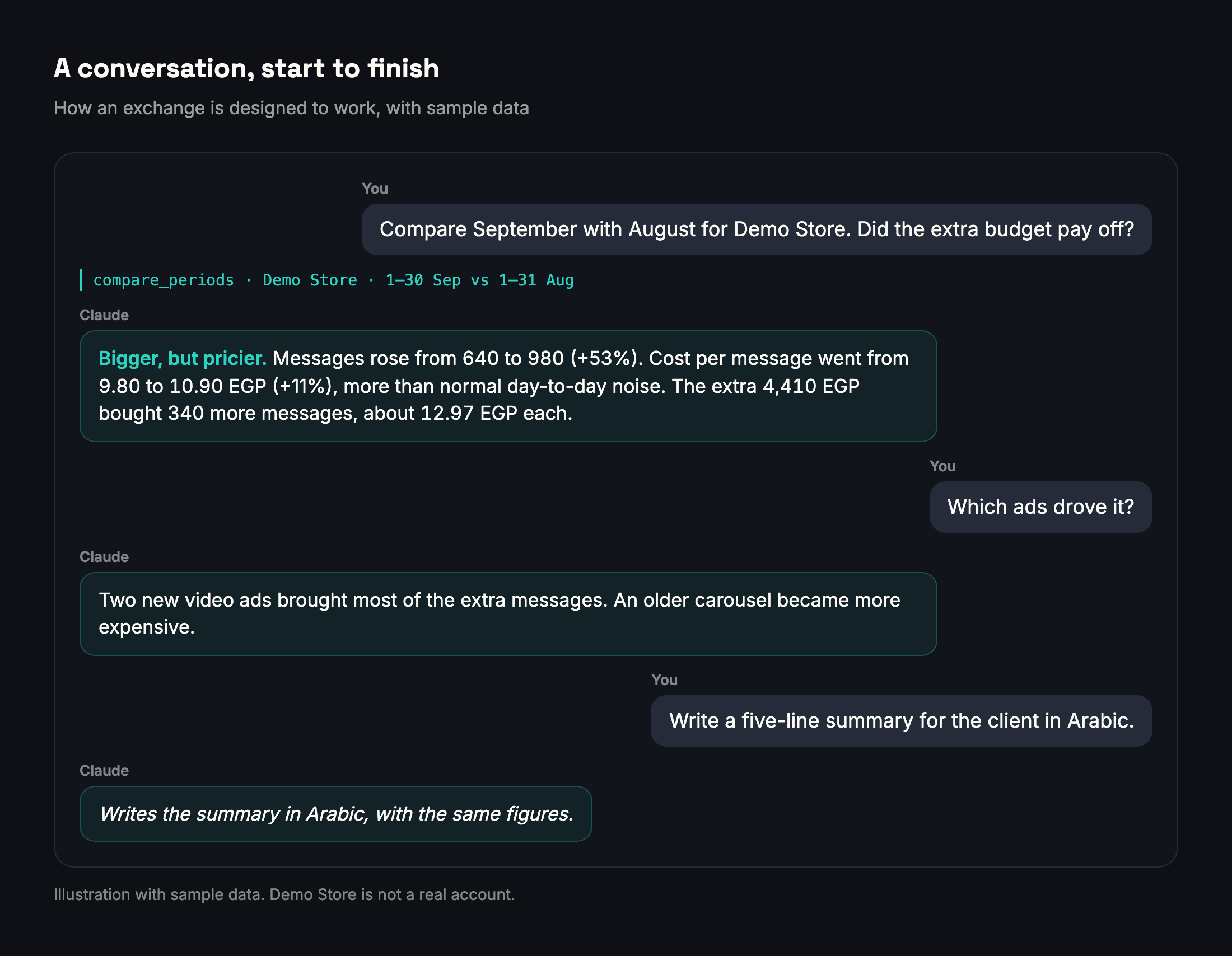
You ask: "Compare September with August for Demo Store. Did the extra budget pay off?"
Claude sees that this is a question about two periods, so it calls the comparison tool for Demo Store's ad account with the two date ranges. Adams Analytics runs the same comparison it runs on your dashboard and hands back the verdict, the numbers behind it and the ads that drove it.
Claude answers: "September was bigger, but pricier. Spend rose from 6,272 to 10,682 EGP. Messages rose from 640 to 980, and the cost per message went from 9.80 to 10.90 EGP, an 11% increase that is large enough not to be normal day-to-day noise. The extra 4,410 EGP bought 340 more messages, about 12.97 EGP each, so the added budget worked, but each extra message cost more than the average."
You ask: "Which ads drove it?"
Claude answers with the ads that moved most, each with its own goal and cost, and points out that two new video ads produced most of the extra messages while an older carousel became more expensive.
You ask: "Write a five-line summary for the client in Arabic."
Claude writes the summary in Arabic, using the same numbers.
You ask: "Make it a report and give me the link."
Claude answers that it cannot create reports through the connector yet, and suggests opening Adams Analytics to make the branded report. That is deliberate. The first version only reads, and creating a report is something you will do on the site.
Notice what Claude did not do. It did not add up reach across ads. It did not mix messages with link clicks. It did not call the change "worse" without checking that it was bigger than normal ups and downs, and it worked out the cost of the extra results instead of only comparing averages. Those calls are made by tested code in Adams Analytics, the same code described in our guide to comparing two periods. Claude reads them out and explains them.
A Monday morning, the new way
Here is the routine from the start of this article, redone with the connector. The agency, its clients and the numbers are sample data.
8:30. You open the Weekly check across all accounts template: last week against the week before, only the accounts that need attention, and why. Claude compares every account goal by goal and comes back with three accounts out of twelve. In the first, cost per message rose 31% on 412 messages. The second will run out of prepaid balance in about two days at its current daily spend. In the third, messages fell 48% because spend on two ad sets dropped sharply in the middle of the week, and Claude suggests checking those ad sets in Ads Manager for delivery problems. The other nine accounts are steady, or too early to judge.
8:40. "For the first account, which ad sets drove the rise?" Claude answers with the two ad sets that moved most, with their spend and cost per message in each week.
8:50. "Draft a short message to that client in Arabic, explaining what happened and what we will test this week." Claude writes it from the same figures. You edit two lines and send it.
9:00. The balance warning goes to the second client's finance contact, and the third account's ad sets go to whoever manages delivery.
Thirty minutes, spent on decisions instead of exports. Nothing in this routine needs Claude to change anything in Meta, which is exactly why the first version of the connector only reads.
Why the answers will match your dashboard
When your client asks why the number in your report differs from the number you said in a meeting, "the AI said so" is not an answer. So consistency is the first thing we designed for.
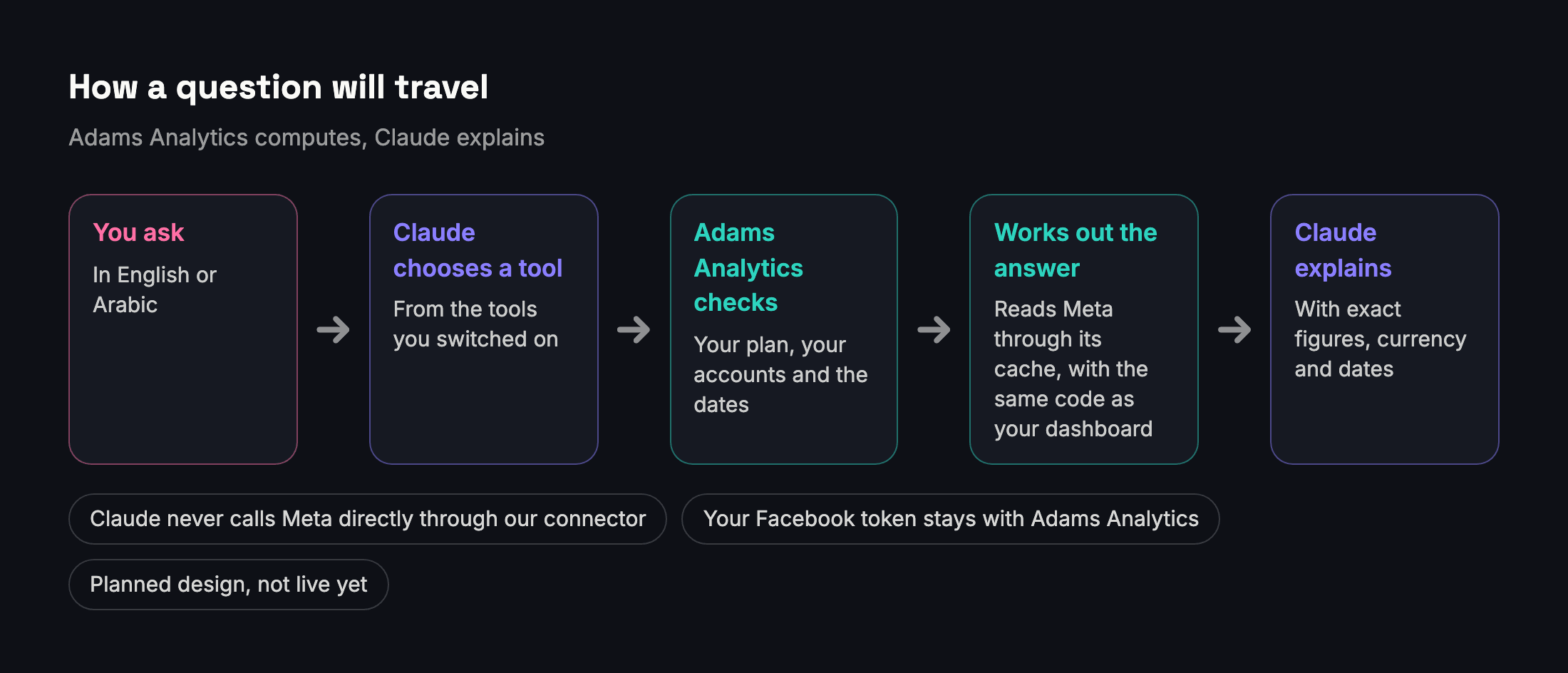
- One engine. Each tool will call the same code that builds your Adams Analytics dashboard and client reports. A number in Claude and the same number on screen come from one calculation, so they cannot drift apart. Before launch we will check that every tool returns the same numbers as the dashboard for the same account and dates.
- Results per goal, from Meta's own figure. Meta counts results based on the objective and settings you chose, so a messaging ad's results are messages and a sales ad's results are purchases. Adams Analytics uses Meta's own Results figure for each goal, the number Ads Manager shows, and never adds different goals into one total. Our metrics glossary explains each one.
- Reach that is not double-counted. Reach counts people, and the same person can see several of your ads. Adams Analytics uses Meta's de-duplicated reach for the whole account instead of adding up each ad's reach, as we explain in reach versus impressions.
- Comparisons with a noise test. A change in cost per result is called only when each period has at least 20 results and the difference is bigger than normal ups and downs. Otherwise the answer is "Too early to judge", and Claude will say so.
- Short, exact answers. Anthropic's own engineering guidance says tools should return only high-signal information to the AI, and that more tools do not always lead to better outcomes. Our tools will return exact numbers with the currency, the date range and any notes about data quality, top results first, rather than dumping whole tables.
There is one limit we will not hide. Anthropic's documentation says plainly that even the most advanced models, Claude included, "can sometimes generate text that is factually incorrect or inconsistent with the given context." Good tools make that much less likely, but not impossible. So ask Claude to show the exact figures the tool returned, keep the date range in your question, and check anything you will send to a client against your dashboard or report.
What it will not do
Being clear about the limits is part of being easy to use.
- It will not change your ads. The first version only reads. It cannot change budgets, pause ads, create campaigns or edit anything in Meta. If you want an assistant to make changes, that is the job of Meta's own connector or of Ads Manager.
- It will not see accounts you have not added. Claude sees only the ad accounts, Pages and Instagram accounts attached to your workspace in Adams Analytics.
- It will not go beyond your plan. Each tool follows the same plan rules as the site, including how far back in time you can look.
- It will not make creative. No images, videos or ad copy generation. Claude can still help you write copy in the chat, but not through our connector.
- It will not replace your client report. When you need a branded report with your logo, Adams Analytics still makes it. A later version may let Claude create one for you, counting toward your monthly report limit, under its own separate permission.
- It will not cover other channels. Adams Analytics is built for Meta: Facebook and Instagram ads, Facebook Pages and Instagram accounts. It does not report Google, TikTok or Snapchat.
Adams Analytics and Meta's own connector
You may have heard that Meta already has a connector for AI assistants. It does, and you should know exactly what it does, because the two are built for different jobs.
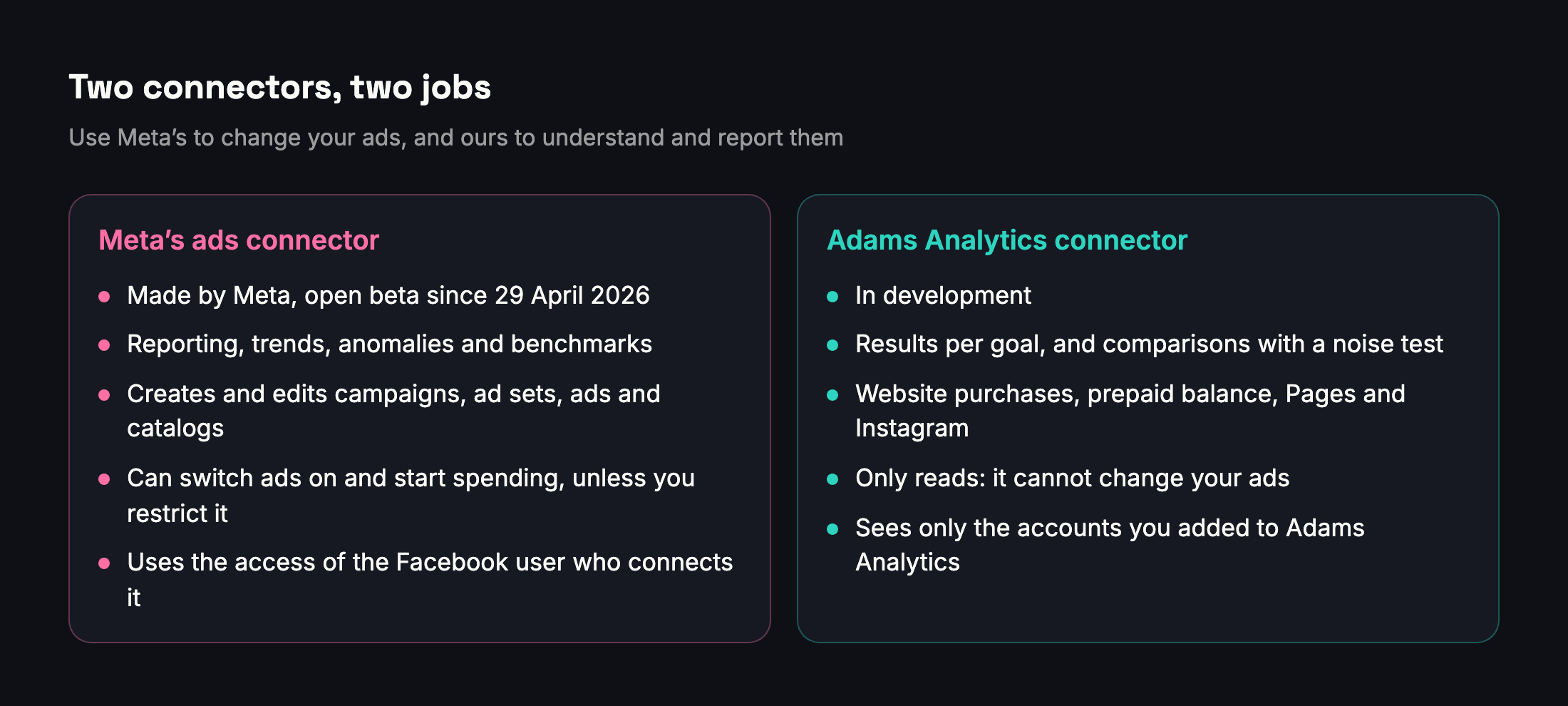
On 29 April 2026 Meta launched its ads AI connectors in open beta: an ads MCP server and a command-line tool for developers. Meta's developer documentation says the server is hosted at mcp.facebook.com/ads and works with any MCP-compatible AI agent. Its tools fall into seven groups: reporting; ad creation and management; catalogs; signals and datasets; help and troubleshooting; A/B tests and conversion lift studies; and activity logs. It can create campaigns, ad sets and ads, which start paused, and it has a tool that switches them on and starts spending. Its reporting tools return performance by campaign, ad set or ad, an optimization score, anomaly signals, auction and industry benchmarks, and performance trends.
On 16 July 2026 Meta added rules that let anyone with full control of a business portfolio decide what AI agents may do on an ad account, for example read performance without changing budgets, campaigns or creative.
| Meta's ads connector | Adams Analytics connector | |
|---|---|---|
| Status | Open beta since 29 April 2026 | In development |
| Main job | Reporting, and creating and editing ads, catalogs and datasets | Analysis and client reporting |
| Can it change your ads? | Yes, including budgets and switching ads on, unless you restrict it | No, the first version only reads |
| Which accounts it sees | The connecting Facebook user's access, in the business portfolios chosen | Only the accounts you added to Adams Analytics |
| What its reporting covers | Campaigns, ad sets and ads, with trends, anomalies, benchmarks and an optimization score | Results per goal, period comparisons, website purchases, prepaid balance, Facebook Pages and Instagram |
| Who works out the answer | Meta's tools return the data, and the assistant puts it together | Adams Analytics, the same way as your dashboard and client reports |
Meta's connector is strong where Meta is strongest: making and changing ads, Meta's own benchmarks, and checking pixels and datasets. Adams Analytics adds what an agency or a business owner needs to understand results and report them: Pages and Instagram analytics, comparisons judged goal by goal, website purchases with the purchases other campaigns assisted, prepaid balance across every account, and your reports.
Two points about Meta's connector are worth knowing before you add it. Jon Loomer, who has written about Meta advertising for years, noted after the launch that the connector "inherits all your Facebook user's account access", including client ad accounts. In August he reported that the new Ads MCP Server page in Meta's Business Settings listed each ad account as allowing all seven kinds of actions by default, including budgets, targeting and creative, until you change it.
Our recommendation is to use Meta's connector to change your ads and ours to understand and report them. You can switch both on in the same Claude chat. On the Free plan you can only add one custom connector, so using both needs a paid Claude plan.
Security and privacy, in plain words
Connecting your ads to an AI assistant raises fair questions. Here are straight answers about how the connector is designed.
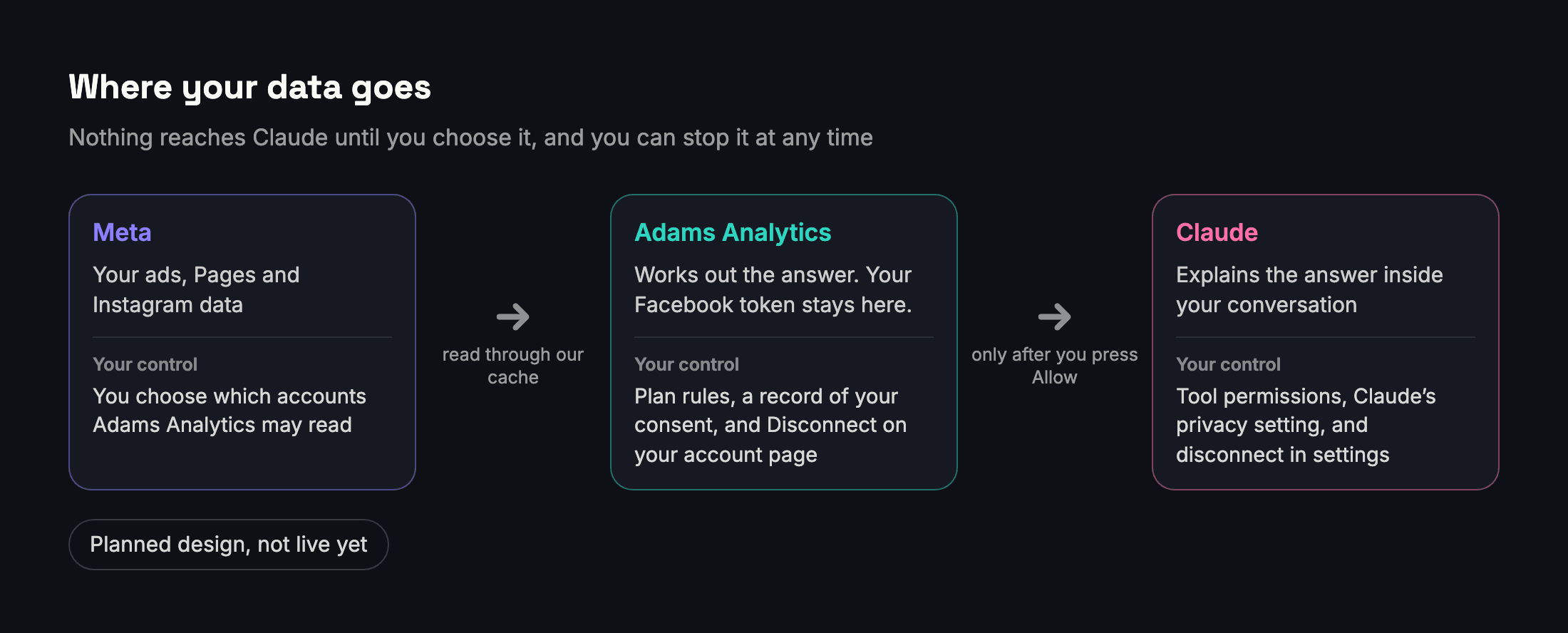
You sign in on our page, not Claude's. The connector uses OAuth, the same standard behind "Sign in with Google" buttons. You type your password only on the Adams Analytics sign-in page. Claude receives a token that works only for this connection. It never sees your password, and it never receives your Facebook access token, which stays on our servers.
Connecting is always your choice. Meta's Platform Terms allow an app like ours to share your Meta data with another company, such as Anthropic, when you expressly direct us to or expressly consent, and they require us to keep proof of that. So the consent screen will name Claude and list what it can read, we will keep a record of your choice, and you will be able to disconnect at any time, from your Adams Analytics account page or from Claude's settings.
What happens to the data in Claude. When Claude reads data from a connected service, Anthropic's privacy policy treats it as part of your conversation, which the policy calls your Inputs. On Claude Free, Pro and Max you choose in your privacy settings whether your chats can be used to improve Claude. Anthropic says that if you allow it, it keeps that data for up to five years, and if you do not, its existing 30-day retention period applies. Team and Enterprise plans are Anthropic's commercial Claude for Work products, and Anthropic says that by default it does not use their inputs or outputs to train its models. If you work with clients' data, we recommend turning that setting off, or using a Team plan.
You control every tool. In Claude you can set each connector tool to run automatically, to ask for approval first, or to be switched off. Anthropic's review rules say that tools which only read can run without asking every time, while tools that change data always ask. Because every tool in our first version only reads, it can run without interrupting you, and nothing it does can change your ads.
Text in your ads cannot give orders. An ad name, a caption or a Page post could contain text written to steer an AI, a trick called prompt injection. The connector returns that text as data, never as instructions, and because it cannot take actions, the worst case is a misleading answer, not a changed campaign. Anthropic itself warns that malicious connectors may hide instructions, so only add connectors from companies you trust.
It will not hammer Meta. In March 2026 several advertisers reported ad accounts shut down without warning after connecting them to AI agents, and Jon Loomer suspected the cause was the volume of API calls. Claude will not talk to Meta directly through our connector. It will ask Adams Analytics, which reads Meta through the same connection your dashboard already uses, with caching and limits on how many requests each user can make. Nobody can promise how Meta will treat any integration, but we are designing for the lightest touch possible.
Who it is for
The connector is built for people who already live in their numbers and want to spend less time fetching them.

Agencies. Run a weekly check across every client in one question: "Which of my clients had a worse week, and why?" Prepare a monthly review per client in English or Arabic, and spot accounts that are about to run out of prepaid balance before the ads stop.
Media buyers. Diagnose a drop in minutes: "Results fell on Tuesday. Which ad sets moved, and was it cost or volume?" Find the best ads by goal, not by a mixed total, and check whether a budget increase bought results at a good marginal cost.
Store owners. Ask what the ads really brought: website purchases, their value and what each cost, with purchases from messaging campaigns kept apart as assisted. Our article on Ads Manager versus your store's sales explains why those numbers differ from your store's orders.
Page and Instagram managers. Compare organic and boosted results, find the posts that worked without ads, and see how views from your followers compare with views from people who do not follow you yet.

What we still have to do before launch
Writing the connector is the smaller part of the work. Doing it properly takes longer, and we would rather tell you what is left than promise a date.
- Build the sign-in server and the consent screen, including a Connected apps section on your account page that shows each Claude connection, when it was last used, and a Disconnect button.
- Move a few heavy features into shared code, so the dashboard and the connector run the same calculation for Pages, prepaid balance and website purchases.
- Prove the numbers match: every tool against the dashboard, for the same account and dates, before anyone else uses it.
- Check everything against Meta's Platform Terms for sharing data with another company at your request, and update our privacy policy to explain it.
- Decide which plans include it, publish a setup page in English and Arabic, and submit the connector to Anthropic's Connectors Directory. Anthropic scans each submission automatically and lists it as a Community connector by default.
When the connector is ready, this article will say so at the top and link to the setup page.
How to get ready today
You do not have to wait to start working this way.
- Get your accounts in order. Connect Facebook in Adams Analytics and add the ad accounts, Pages and Instagram accounts you care about. On launch day they will be ready for Claude.
- Check your Claude plan and privacy setting. Decide whether you need a paid plan to use more than one connector, and set the model-training choice the way your clients would expect.
- Try the workflow now. Open an Adams Analytics report in your browser, save it as a PDF, upload it to Claude and ask what changed and why. It is not live data, but it shows you how it feels to talk to your report instead of reading it. The same Claude privacy setting applies to anything you upload.
- Tell us your first question. Use the WhatsApp button on this page and tell us the question you would ask first. The questions we hear will shape the first version.
Questions
Is the Adams Analytics connector for Claude available now?
Not yet. It is in development and we have not set a launch date. This article describes the plan, and we will update it when the connector is available.
Do I need a paid Claude plan?
No. Anthropic offers custom connectors on every Claude plan, including Free, but Free is limited to one custom connector. To use ours alongside another custom connector, such as Meta's, you need a paid plan.
Which Adams Analytics plans will include the connector?
We will announce that at launch. Whatever your plan, the connector will only return what that plan already includes on the site.
Can Claude change my ads through the connector?
No. Every tool in the first version only reads. It cannot change budgets, pause ads or create campaigns. Meta's own connector or Ads Manager is the place for changes.
Will Claude see my Facebook password or access token?
No. You sign in on the Adams Analytics page, and Claude receives a token that works only for this connection. Your Facebook access token stays on our servers.
Can I ask in Arabic?
Yes. Ask in Arabic and Claude answers in Arabic, using the same numbers. You can also ask it to write client summaries in Arabic from those numbers.
Can I use it together with Meta's own connector?
Yes. Use Meta's to change your ads and ours to understand and report them. On Claude's Free plan you can add only one custom connector, so using both needs a paid plan.
What if Claude gets a number wrong?
Ask it to show the exact figures the tool returned, with dates and currency, and compare them with your Adams Analytics dashboard. Our tools do the maths, so a difference usually comes from the question, such as different dates. If it does not, tell us.
Sources
- Meta for Business — Introducing Meta ads AI connectors (29 April 2026)
- Meta for Developers — Ads MCP Server overview
- Claude Help Center — Get started with custom connectors using remote MCP
- Claude documentation — Submit a connector to the directory
- Claude documentation — Connector pre-submission checklist
- Meta for Developers — Meta Platform Terms
- Anthropic — Privacy Policy
- Anthropic — Updates to our consumer terms (August 2025)
- Anthropic Privacy Center — Is my data used for model training?
- Anthropic — Introducing the Model Context Protocol (November 2024)
- Anthropic — Donating the Model Context Protocol and establishing the Agentic AI Foundation (December 2025)
- Model Context Protocol — What is the Model Context Protocol (MCP)?
- Claude Code documentation — Connect Claude Code to tools via MCP
- Anthropic Engineering — Writing effective tools for agents, with agents (September 2025)
- Claude documentation — Reduce hallucinations
- Jon Loomer — Meta Ads AI connectors and Claude: setup, uses and risks (May 2026)
- Jon Loomer — Meta Ads AI connectors: the new security controls (August 2026)
- Jon Loomer — AI-related ad account shutdowns (March 2026)
- Claude documentation — Authentication for connectors
Send your next client report in minutes
Adams Analytics connects to your Meta ad accounts and builds branded PDF reports in English or Arabic. Free for 7 days — no credit card.
Start free trialWritten by the Adams Analytics team and checked against Meta’s documentation and our own product. Spotted something out of date? Tell us at support@buildincairo.com.