The store dashboard says 180 orders this month. Ads Manager says 64 purchases. Or the other way round: Ads Manager says 64, and only 40 orders were delivered. The client wants to know which number is right. Usually both are, because they answer different questions.
Two counts, two questions
- The store records every order, from every source, on the day it was placed.
- Ads Manager shows only the purchases Meta attributes to your ads, under each ad set's attribution setting, with duplicates removed (Meta).
So the store answers "how much did we sell?" and Ads Manager answers "how much of it does Meta credit to the ads?". Here is why the two numbers drift apart.
1. Not every order came from an ad
Customers who come from search, Instagram posts, a friend's recommendation or a past order are in the store's total but not in Ads Manager. For most businesses that is the main reason the store's number is higher.
2. The attribution window
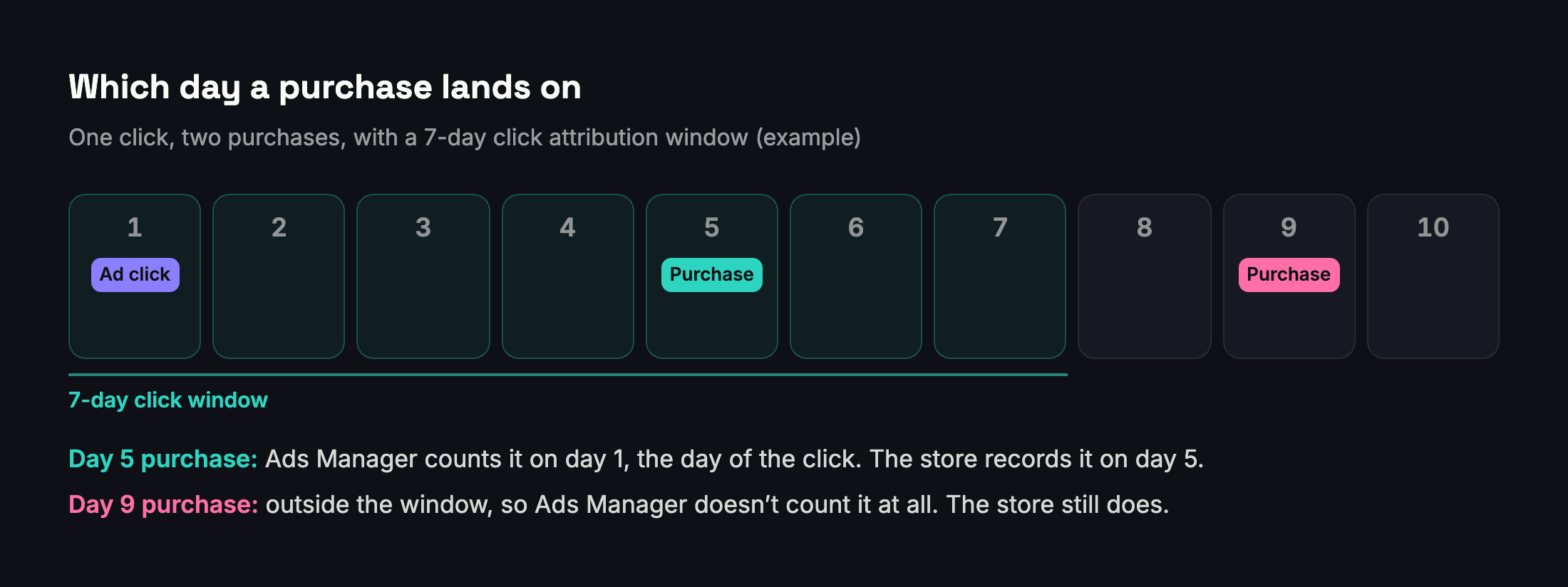
Meta credits a purchase to your ad only if it happens within a set number of days after someone clicked or viewed the ad; that window is the attribution setting of each ad set (Meta). A purchase made after the window closes isn't counted. And when the setting includes views, Meta can credit a purchase to someone who saw the ad without clicking, which another tool may credit to a different channel.
3. The date
Meta's reporting can date a conversion to the day of the ad impression that led to it rather than the day of the purchase: someone who sees an ad on 1 January and buys on 2 January can show up on 1 January (Meta). The store uses the order date. Totals over a long period come close; day by day they rarely match.
4. Purchases the pixel never saw
A browser-based pixel misses some purchases: pages that fail to load, connection problems, ad blockers. Meta's Conversions API sends events from the business's server instead, and Meta says it is less affected by those problems than the pixel (Meta). Without it, some real purchases never reach Meta at all.
5. Events Manager is a third number
Events Manager shows attributed and unattributed events, and its event totals are counted before duplicates are removed, so it is usually higher than Ads Manager (Meta). Don't compare a store's orders with Events Manager's totals and expect either of the other two to agree.
6. Cancelled, refused and returned orders
The website usually reports a purchase to Meta at checkout. If that order is later cancelled, refused at the door or returned, the store's delivered orders go down, but the purchase Meta already received stays counted. Where cash on delivery is common, as in Egypt, this alone can make Ads Manager's purchases higher than the orders that were actually paid for.
7. The value isn't the store's revenue
The purchase value in Ads Manager is the value the website sent with each purchase event. Depending on the setup it may include or exclude shipping, discounts and taxes, and it never subtracts product costs or returns. It is attributed purchase value, not revenue or profit.
How to report both
| The client asks | Use | Say |
|---|---|---|
| How much did we sell? | The store | All orders, all sources |
| How much did the ads bring in? | Ads Manager | Attributed by Meta's rules, with its attribution setting |
| What did each sale cost? | Amount spent ÷ purchases in Ads Manager | Cost per attributed purchase |
| Are the ads worth it overall? | Store revenue ÷ total ad spend | A blended view across all channels |
Before comparing anything:
- Use the same dates and time zone. The ad account has its own time zone setting; make sure the store report uses the same one.
- Count delivered orders separately when cash on delivery is common, and report the gap.
- Expect Ads Manager to be lower than the store total. If it is higher, look for orders that were cancelled after checkout, purchase events sent twice, or credit for people who only viewed an ad.
- Agree with the client which number drives decisions. Most teams optimise with Ads Manager and judge the business with the store.
How Adams Analytics reports website purchases
The Website Purchase report in Adams Analytics counts the website purchases Meta attributes to your ads, keeps purchases from other campaigns (such as messaging campaigns that also sold) in a separate "assisted" list, and labels the money as attributed purchase value and value after ad spend, never as revenue or profit. It also states the attribution windows the ad sets use, and says so when they differ. See how it works.
Questions
Why does Ads Manager show fewer purchases than my store?
Because it counts only purchases Meta attributes to your ads within each ad set’s attribution window. Orders from search, posts, returning customers and other channels are in the store’s total but not in Ads Manager.
Why does Ads Manager show more purchases than my delivered orders?
Common causes are orders cancelled or refused after checkout (Meta keeps the purchase it received), purchase events sent twice, and credit for people who saw an ad without clicking.
Which number is right?
Usually both. The store counts every order; Ads Manager counts the purchases Meta credits to your ads. Report each for the question it answers.
Why don’t the daily numbers match?
Ads Manager reports a conversion on the date of the click or impression that led to it, while the store uses the order date. Over longer periods the totals get closer.
Does the Conversions API fix the difference?
It reduces purchases that never reach Meta, because it is less affected by page-loading errors, connection problems and ad blockers. Differences from attribution, dates and other channels remain.
Sources
Send your next client report in minutes
Adams Analytics connects to your Meta ad accounts and builds branded PDF reports in English or Arabic. Free for 7 days — no credit card.
Start free trialWritten by the Adams Analytics team and checked against Meta’s documentation and our own product. Spotted something out of date? Tell us at support@buildincairo.com.