Making an ad used to be the slow part of media buying. Now it is the fast part. Meta says more than 9 million small businesses used at least one of its AI creative tools in the second quarter of 2026, and that the use of image generation more than doubled in that quarter alone (Meta). When Meta introduced its Andromeda retrieval engine, it said more than a million advertisers had used its generative AI tools to create more than 15 million ads in a single month (Engineering at Meta).
Cheap production moves the work somewhere else. If anyone can produce fifty versions of an ad in an afternoon, versions stop being an advantage. Ideas are the advantage now, together with the discipline to test them properly and to keep the brand intact while you do. This guide gives you a system for both.

What Meta’s AI creative tools can do today
Inside Ads Manager, Advantage+ creative can change and extend your ads automatically, and Meta lets you preview the changes and switch off the ones you don’t want before publishing (Meta for Business). The main tools, and what to check in each:
| Tool | What it does | Check before publishing |
|---|---|---|
| Background generation | Places a product photo in new, AI-generated backgrounds | That the product itself is unchanged |
| Image expansion | Extends an image to fit placements such as Stories and Reels | That nothing misleading was invented at the edges |
| Image animation and video expansion | Adds motion to still images, and fits videos to placements such as Reels | That the motion does not distort the product or the text |
| Text variations | Writes alternative primary texts and headlines | Prices, claims and tone, especially in Arabic |
| Format variations | Turns one asset into single image, video and carousel versions | That every version still reads clearly on a phone |
Do they work? Meta’s own figures say they can. In April 2025, Meta reported that campaigns using image generation within Advantage+ creative saw an 11% higher click-through rate and a 7.6% higher conversion rate than campaigns that didn’t use it (Meta for Business). As with every platform-wide figure, those are averages, and your account still needs its own test.
More is coming. On its second-quarter 2026 call, Meta said it had introduced an end-to-end creative solution that turns real performance signals into the next creative decision while keeping a brand’s identity and tone, built to work with agencies’ existing workflows. It added that image generation can now create images from video assets, and that its new Muse Image model will further expand what advertisers can generate on brand and at scale. The tools will keep getting better at producing ads, which makes your judgment about which ideas to produce the part that matters.
Variations are not concepts
The most important rule for AI creative comes from the way Meta’s delivery system reads ads. In December 2025, Meta explained that when several ads look or feel alike, they are treated as variations of the same creative, and learning and delivery are shared at the level of that creative (Meta for Business). Its advice: make ads that speak to different motivations, and ads that are truly different in look, feel, storyline and message.
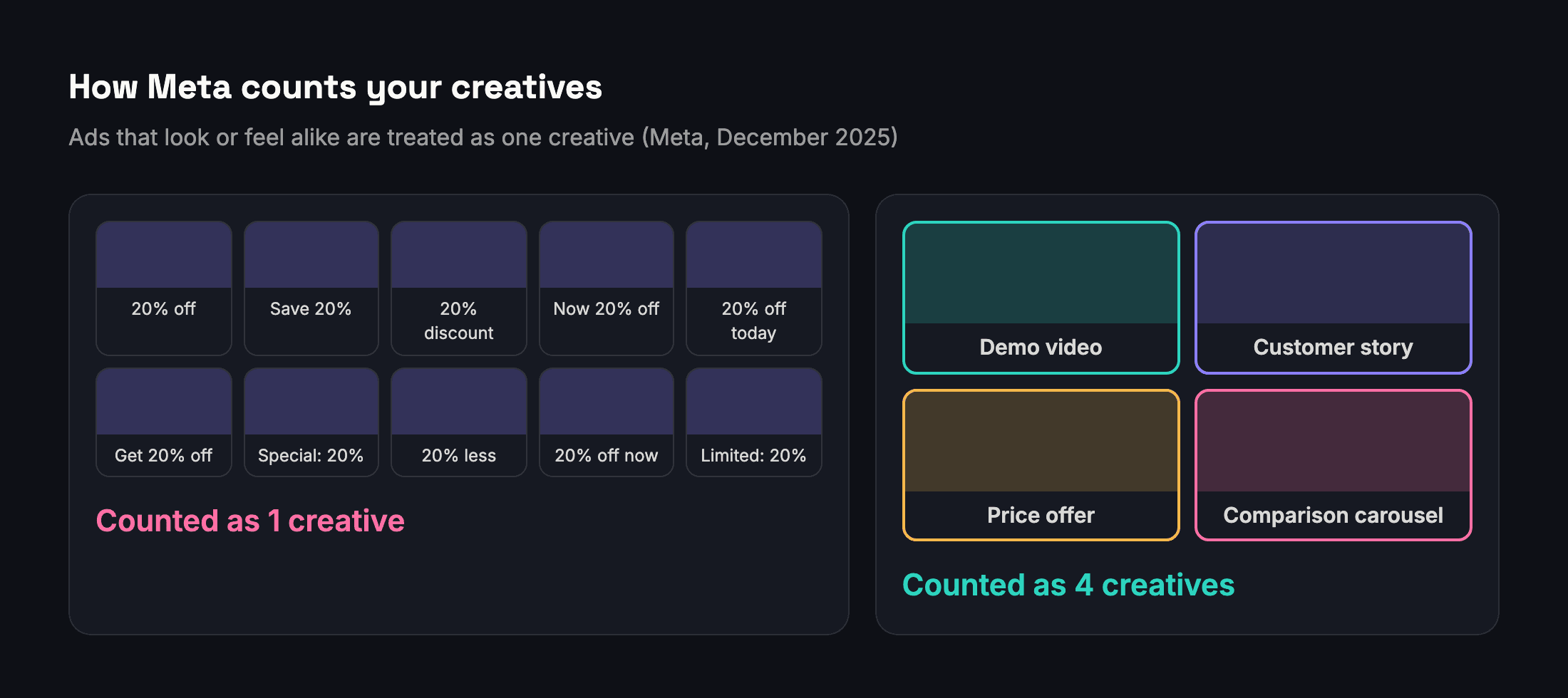
Meta’s Help Center also describes a Creative diversity metric in Ads Manager that rates how visually similar the images and videos inside an ad set are (Meta). A low rating is a prompt to add new ideas, not more edits of the same one.
A concept is defined by the decisions behind an ad, not by its file. Change at least one of these, and you have a new concept:
- The person it speaks to: a first-time buyer, someone buying a gift, a professional, a parent.
- The angle: a problem solved, a demonstration, proof from other customers, a price offer, a comparison.
- The format: a person talking to camera, a product demonstration, an image with one clear line, a carousel of options.
- The setting and the people on screen: at home, at work, outdoors; your customers, your team, a creator.
- The promise: saves time, looks better, costs less, lasts longer.
Here is what that looks like for a modest fashion brand in Cairo (an illustrative example):
| Concept | Angle | Format |
|---|---|---|
| Office outfits under 1,500 EGP | Price and occasion | Carousel of three complete looks |
| One abaya, three ways to wear it | Demonstration | Vertical video, about 20 seconds |
| Customers trying it on | Proof from customers | Customer video filmed on a phone |
| The fabric up close | Quality | Close-up video in natural light |
| Eid gift sets | Occasion | Image with the price and the delivery date |
| Delivered in Cairo within 48 hours | Service promise | Image with one line and a map |
Each row is a different idea, and each one can then be produced in several sizes and versions with AI. That gives the system six real choices instead of one idea repeated six times, and it gives you six honest answers about what your customers respond to.
A creative testing loop that uses AI
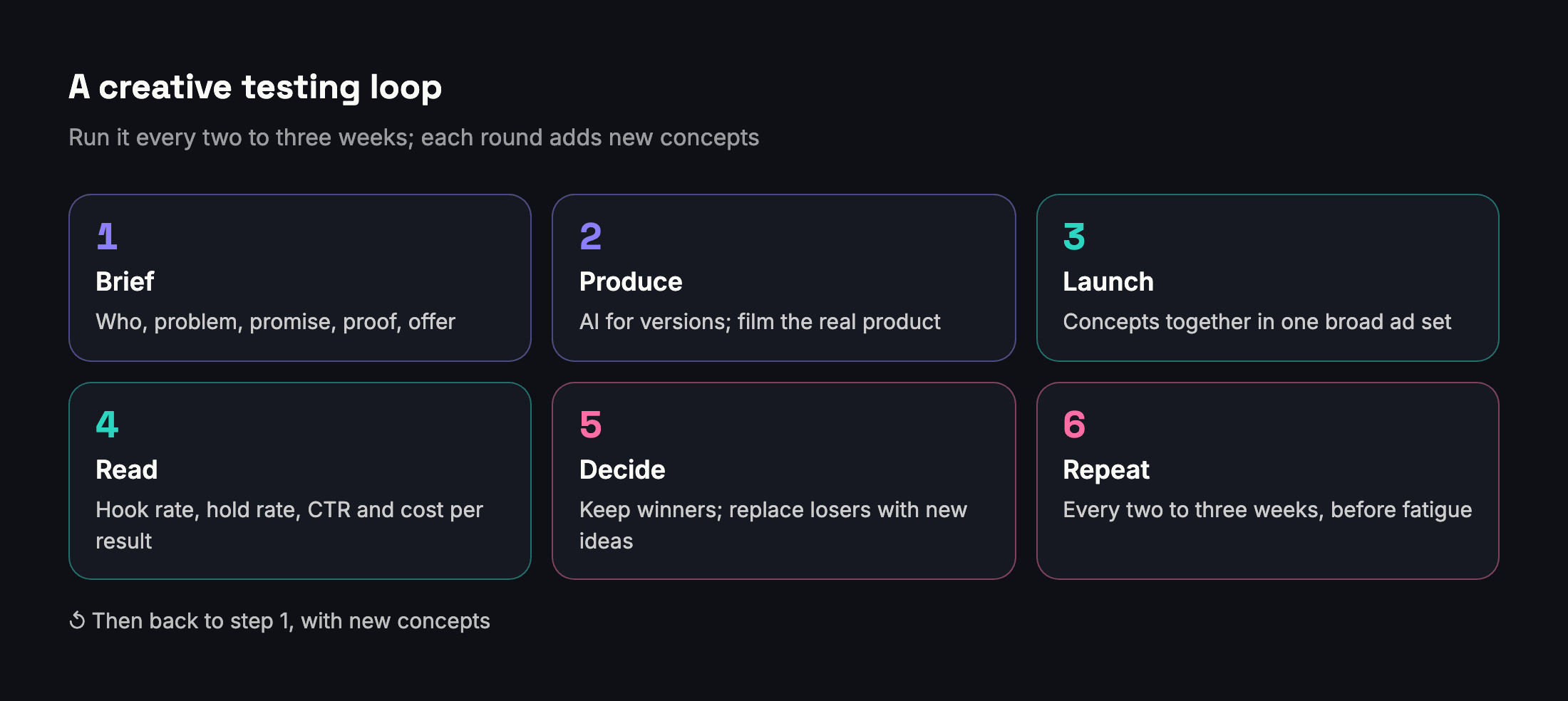
- Brief each concept in five lines: who it is for, the problem, the promise, the proof and the offer. AI can draft the briefs; you choose which ones to make.
- Produce with AI, and film what must be true. Let AI make backgrounds, sizes, text versions and edits. Film the product itself, its texture, fit and use, with a real camera or phone, because that is exactly what the customer will check when it arrives.
- Launch concepts together in one ad set with a broad audience, so the system compares them on the same people at the same time.
- Read each concept on the right numbers once it has enough delivery: hook rate and hold rate for videos, click-through rate, and cost per result for your goal.
- Decide. Keep the winners and make new variations of them; replace the losers with new concepts, not with edits of the same idea.
- Repeat every two to three weeks, before fatigue shows up as rising frequency and a falling click-through rate.

How to brief an AI tool so the output is usable
Generic prompts produce generic ads. The quality of what AI gives you depends on what you give it first:
- The product facts: what it is, the price, the sizes or variants, the delivery time and the guarantee. AI invents whatever you leave out.
- The person: who the ad is for and the one problem they have, described in their words rather than yours.
- The angle and the format: for example, a 20-second vertical video that shows one problem and the product solving it.
- The constraints: no medical or financial promises, no competitor names, no prices that aren’t on the website, and the right Arabic dialect for the market.
- The proof you have: real reviews, real numbers and real photos, so the copy points to evidence instead of inventing it.
- One good example: a past ad that worked, so the tool copies its clarity rather than a generic template.
Brand guardrails for AI creative
AI tools are fast and confident, which is exactly why they need rules. Write the rules once, and use them for every brief and every review:
- A brand kit: how the logo is used, the colors, the fonts, the words you always use and the ones you never use.
- Product truth: the color, size, ingredients, packaging and price in the ad must match what the customer receives.
- Claims: no number, comparison or promise goes live without a source or a decision from the client.
- People: if AI generates a person who looks real, decide whether that fits your brand, and expect the ad to be labeled.
- Language: Arabic copy reviewed by a native speaker, in the right dialect for the market, with text inside images set correctly from right to left.
- One approver: one person signs off before anything goes live, and the client knows who that person is.
AI labels: what Meta shows people
Meta labels ads made with its AI tools. When an image or video is created or significantly edited with Meta’s generative AI creative features, an “AI info” label appears in the ad’s three-dot menu or next to the Sponsored label; when the result includes an AI-generated person who looks real, the label appears next to Sponsored. Minor edits that don’t add a realistic person get no label. Meta also said it would detect ads made with third-party AI tools through industry-standard signals and label them as well (Meta).
AI does not change the rules your ads follow. The same review, the same standards and the same consequences apply to a misleading claim, whether a person or a model wrote it.
When not to use AI
AI is the wrong tool in a few places, and using it there costs more than it saves:
- The exact product shot. The main image of the product, its color and its fit should be a real photo. Generated or heavily edited product images are the fastest way to earn returns.
- Customer reviews and testimonials. Never generate quotes, faces or stories and present them as real customers. Use real reviews, with the customers’ permission.
- Real people’s likeness. Don’t generate images or voices that resemble a known person, a competitor’s spokesperson or your client’s staff without their consent.
- Sensitive promises. Claims about health, money and safety need a source and a human decision, whoever writes the first draft.
- The final approval. AI can check spelling and consistency, but a person approves what goes live.
What to measure for each creative
| Metric | What it tells you | What to do |
|---|---|---|
| Hook rate: 3-second video views ÷ impressions | Whether the first seconds stop the scroll | If it is low, change the opening, not the whole ad |
| Hold rate: ThruPlays ÷ 3-second views | Whether people keep watching once they start | If it is low, shorten the video or bring the offer forward |
| Click-through rate | Whether the ad makes people want to know more | Low with a good hook usually means a weak message or offer |
| Cost per result, per goal | Whether the ad produces what you pay for, at a price that works | The final judge; compare only within the same goal |
| Frequency | How often the same people have seen it | Rising, with a falling click-through rate: refresh the concept |
| Meta’s quality, engagement and conversion rankings | How the ad compares with ads competing for the same audience | Below average on quality: look for clickbait or low-quality elements |

Read creative numbers only after each ad has had enough delivery: a hook rate from a few hundred impressions says very little. Compare ads within the same campaign and goal. And when a client asks why a month got worse, start with the creative before blaming the algorithm; our guide to explaining a worse month to a client shows how.
Where Adams Analytics fits
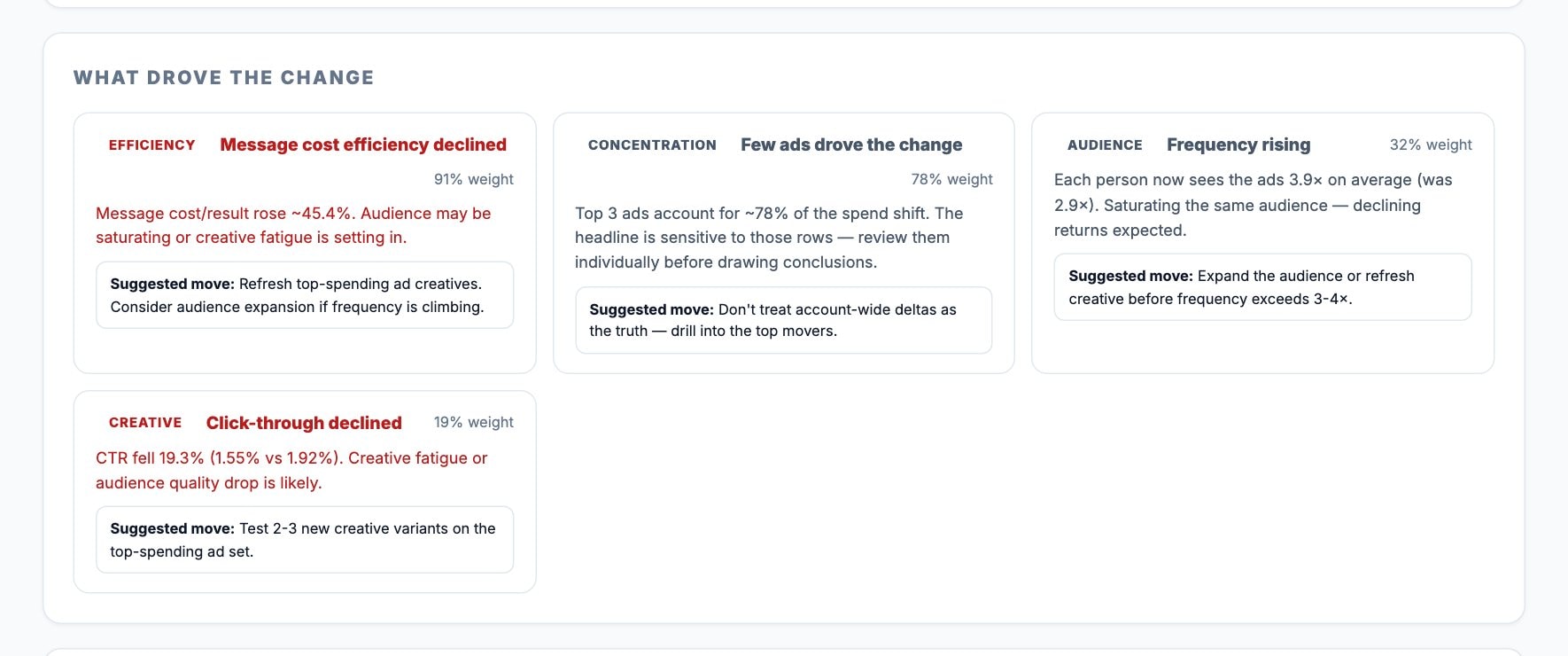
In Account Detail, Adams Analytics can add hook rate, hold rate and Meta’s quality, engagement and conversion rankings for every ad, next to its results and cost per result for each goal. On plans that include the Ads Creative report, you see each ad’s picture next to its results, its cost per result and its hook rate. And when a month gets worse, the comparison lists what drove the change, including how the creative performed, with a suggested next step for each cause.
The short version
- AI made ad production cheap; ideas, testing and brand control are now the scarce skills.
- Ads that look alike are treated as one creative, so change the person, the angle, the format, the setting or the promise.
- Test concepts together in one broad ad set, read them on hook rate, click-through rate and cost per result, and refresh every few weeks.
- Write brand rules once, and review every AI output against them before it goes live.
- Ads made or heavily edited with Meta’s AI tools carry an “AI info” label, and honesty works better than hiding it.
Questions
Are AI-generated ads allowed on Facebook and Instagram?
Yes. Meta provides its own generative AI tools in Ads Manager. Ads created or significantly edited with them get an “AI info” label, and they must meet the same advertising standards as any other ad.
Do AI-generated ads perform better?
Meta reported that campaigns using image generation in Advantage+ creative had an 11% higher click-through rate and a 7.6% higher conversion rate on average. Your results depend on the idea behind the ad, so test AI versions against your current best ads.
How many new creatives do I need each month?
Count concepts, not files. A practical rhythm is two to four new concepts every two to three weeks for each ad set, each in a few formats, and more often when frequency rises quickly.
What is a good hook rate?
There is no single benchmark that fits every product and placement. Compare your ads with each other within the same campaign, and watch whether a concept’s hook rate falls over time, which is an early sign of fatigue.
Will the AI label hurt my results?
The label tells people how the image was made. What reliably hurts results is an image customers find misleading: complaints, hidden ads and refunds cost far more than a label.
Sources
- Meta — Second Quarter 2026 Results Conference Call, transcript (July 2026)
- Engineering at Meta — Meta Andromeda, the personalized ads retrieval engine (December 2024)
- Meta for Business — Advantage+ creative
- Meta for Business — The Creative Advantage: unlocking the power of diversification with Meta Andromeda (April 2025)
- Meta for Business — Demystifying creative diversification (December 2025)
- Meta Business Help Center — Creative diversity
- Meta Newsroom — Expanding generative AI transparency for Meta’s ads products (February 2025, updated June 2026)
Send your next client report in minutes
Adams Analytics connects to your Meta ad accounts and builds branded PDF reports in English or Arabic. Free for 7 days — no credit card.
Start free trialWritten by the Adams Analytics team and checked against Meta’s documentation and our own product. Spotted something out of date? Tell us at support@buildincairo.com.