Google's free dashboard tool is called Data Studio again: Google has renamed Looker Studio back to its original name (Google). Whatever the name, it is one of the most common ways agencies build client dashboards. For Meta ads, it comes with one catch that shapes everything else: the Meta data doesn't come from Google.
What it actually costs
- The tool: Data Studio has a no-cost version, and Data Studio Pro is a paid subscription that adds enterprise features on top of it (Google).
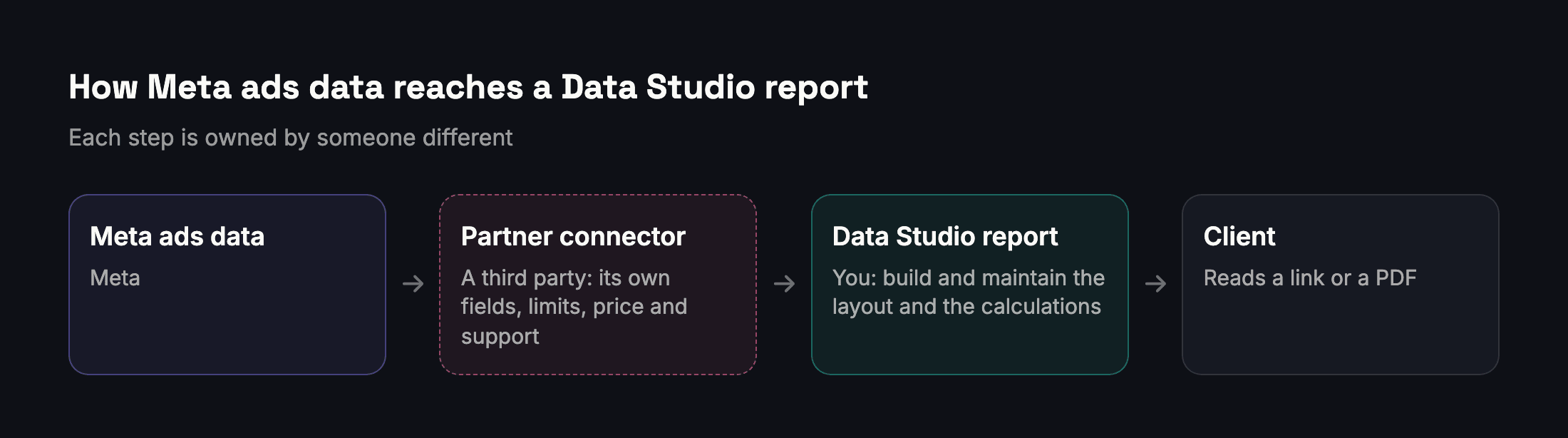
- The Meta data: Google builds connectors for its own and some other products, but Facebook Ads data comes through connectors built by third-party developers (Google). Each partner connector declares its own fee type and support page (Google): some are free, others charge a monthly fee.
- Your time: someone has to design the report, write the calculations and keep both working when Meta, the connector or the client's needs change.
Where Data Studio shines
- Several channels in one place. If the client wants Google Ads, Meta ads and website analytics side by side, a single dashboard is Data Studio's strength.
- Full control of the design. Any layout, any chart, any calculated field.
- Live links. A dashboard the client can open any time, instead of a monthly file.
- Teams with an analyst. If someone on the team enjoys building and maintaining reports, the flexibility pays off.
Where it takes more work
- The connector is a separate product. Its fields, limits and price decide what you can report, and if it changes, your dashboards change with it.
- You build the logic. Data Studio adds up whatever you point it at. Totalling a reach column overstates reach, and averaging cost per result across ads gives the wrong cost; the reach article explains why. Results per goal, comparisons that account for different period lengths and noise, and de-duplicated reach for a custom selection all have to be built and checked by you.
- Client-ready explanations are manual. A chart shows that the cost per message rose; someone still has to write why, and what happens next.
- Arabic needs testing. If clients read Arabic, check right-to-left layout, Arabic fonts and number formatting in your actual report before committing to it.
Which to choose
| You need | A better fit |
|---|---|
| Google Ads, Meta and website data in one dashboard | Data Studio with connectors |
| A fully custom layout and calculations | Data Studio |
| Meta-only client reports with little setup | A Meta-focused reporting tool |
| Arabic reports, results per goal and written comparisons | A tool built for that, such as Adams Analytics |
Many agencies use both: a multi-channel dashboard for the team, and a finished Meta report for the client.
How Adams Analytics differs
Adams Analytics connects to Meta directly and produces the finished report instead of a blank canvas: results for each goal from Meta's own figures, Meta's de-duplicated reach on its dashboards, a comparison of two periods written in plain words with what drove the change, and an Account Detail report in Arabic or English with your logo and your client's. It does not export data to other tools; it is built to replace the report-building step, not to feed it. See how it works or compare plans.
Questions
Is Looker Studio the same as Data Studio?
Yes. Google has renamed Looker Studio back to Data Studio, the product’s original name.
Is Google Data Studio free?
Data Studio has a no-cost version. Data Studio Pro is a paid subscription with extra enterprise features. Connectors from third parties may cost extra.
Can Data Studio connect to Meta ads directly?
Facebook Ads data comes through connectors built by third-party developers rather than by Google. Each one has its own fields, limits, price and support.
What should I check before choosing a Meta connector?
Which metrics and breakdowns it offers (including results and actions), how often it refreshes, how many ad accounts it allows, its price, and who supports it.
What is the most common mistake in Meta dashboards?
Adding up columns that don’t add up: summing reach across ads or days, or averaging cost per result instead of dividing total spend by total results.
Sources
Send your next client report in minutes
Adams Analytics connects to your Meta ad accounts and builds branded PDF reports in English or Arabic. Free for 7 days — no credit card.
Start free trialWritten by the Adams Analytics team and checked against Meta’s documentation and our own product. Spotted something out of date? Tell us at support@buildincairo.com.