Every agency reporting on Meta ads ends up choosing between four kinds of tools. They differ less in their charts than in how much of the client report you still build yourself, and in how their price grows as you add clients. This guide sets out the four, the questions that decide between them, and what to test during a free trial.
1. Meta's own Ads Reporting
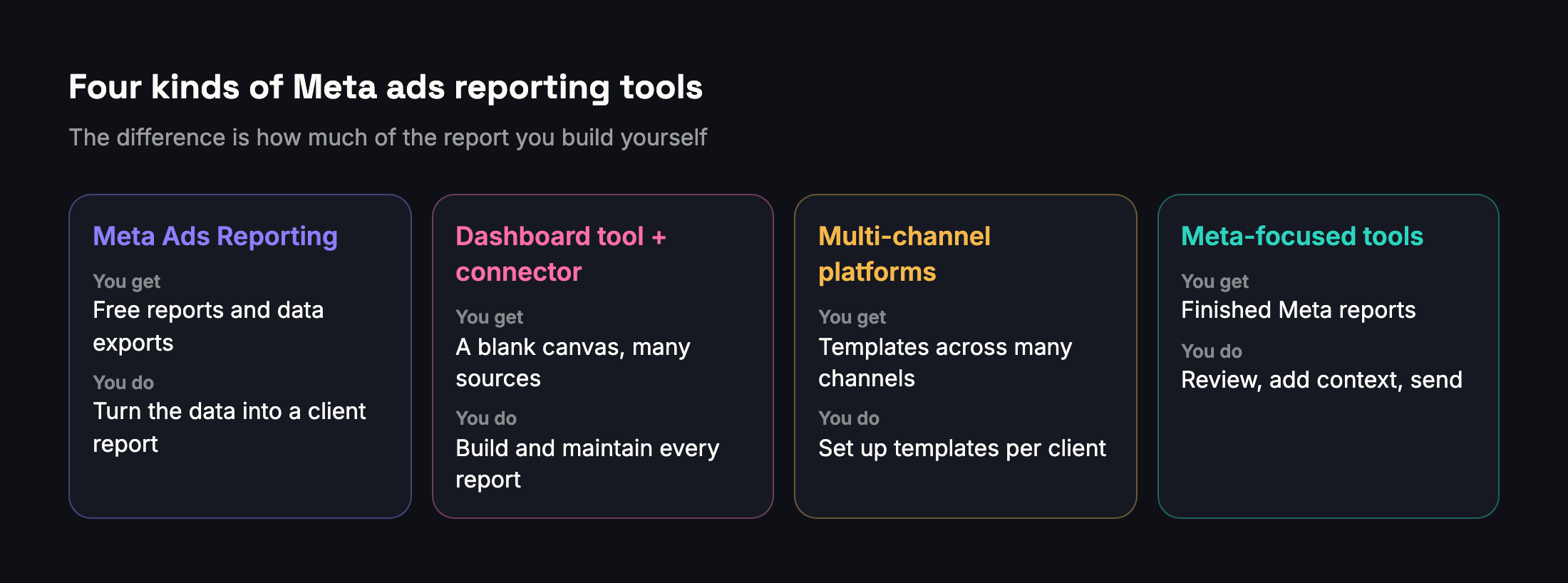
Ads Reporting, inside Meta's ads tools, lets you create, customise, share, export and schedule reports on your campaigns, ad sets and ads (Meta). It is free and uses Meta's numbers directly. Scheduled reports can be emailed to people who have access to the ad account; anyone else gets an exported file (Meta).
Good for in-house teams and agencies whose clients are happy with data files. The work left is turning the data into a report a client understands.
2. A dashboard tool with a connector
Google's Data Studio (called Looker Studio until 2026) has a no-cost version (Google), and Meta data reaches it through third-party connectors. We cover the trade-offs in Data Studio for Meta ads.
Good for agencies that report several channels in one dashboard and have someone to build it. The work left is designing every report and keeping the calculations right.
3. Multi-channel agency reporting platforms
These platforms connect many ad and analytics channels and turn them into templated client reports and dashboards. Their pricing models differ, which matters more than the starting price. As listed on their own pricing pages in October 2026:
- AgencyAnalytics charges per client, from $20 per client a month billed annually, and lists Facebook among more than 85 integrations (AgencyAnalytics).
- Swydo charges by data source, from €69 a month including the first 10 data sources, and offers reports in 14 languages (Swydo).
- DashThis charges by dashboards, from $44 a month for 3 dashboards (DashThis).
All three list a 14-day free trial.
Good for agencies that report several ad channels, such as Google and Meta, for the same clients. The work left is setting up templates per client, and checking that the Meta numbers are reported the way you want.
4. Meta-focused reporting tools
These tools do one platform and go deeper: results for each goal, reach that isn't double-counted, comparisons, and finished reports. Adams Analytics is one of them, so read this section knowing it is ours.
Good for agencies whose clients advertise mostly on Facebook and Instagram, especially when the reports go out in Arabic. The work left is reviewing the report and adding your own context.
The questions that decide
- Which platforms do your clients run? Meta only, or several channels that must sit in one report?
- What does the client receive? A live dashboard, a monthly PDF, or a link on WhatsApp?
- Which language do they read? If it's Arabic, ask each vendor for a sample Arabic report and check the layout runs right to left.
- How does the price grow? Per client, per data source, per dashboard or per ad account: work out your cost at today's size and at twice it.
- Which currency do you pay in? A price in dollars or euros moves with the exchange rate; a local-currency price doesn't.
- Does it count Meta's numbers the way Meta does? Results per goal from Meta's own figures, reach that isn't added up across ads, and the attribution setting stated.
- Does it explain a change, or only chart it?
What to test in a free trial
Then send the report to someone who has never seen Ads Manager and ask what they understood from it.
Where Adams Analytics fits
Adams Analytics is Meta only: Facebook and Instagram ads, plus Facebook Pages and Instagram accounts on plans that include them. Plans are priced in Egyptian pounds as well as US dollars, and their limits are set by ad accounts and monthly reports, not by clients. It produces the finished Account Detail report in Arabic or English, with results per goal from Meta's own figures and a comparison of two periods written in plain words. It doesn't report Google Ads or other channels, and it doesn't export data to other tools. See how it works or compare plans.
Questions
What is the cheapest way to report Meta ads to clients?
Meta’s own Ads Reporting is free. It can email scheduled reports to people with access to the ad account; anyone else needs an exported file, which you then turn into a client report.
Do I need a multi-channel reporting tool?
Only if your clients run other channels that you must report together with Meta. For Meta-only clients, a Meta-focused tool usually needs less setup.
How are agency reporting tools priced?
Common models are per client, per data source, per dashboard or per ad account. Work out the cost at your current size and at twice it before choosing.
What should I test during a free trial?
Rebuild one real month for one client and compare the results per goal, the cost per result and the account’s reach with Ads Manager. Then check whether a non-expert understands the report.
Does Adams Analytics report Google Ads or TikTok?
No. Adams Analytics is built for Meta: Facebook and Instagram ads, plus Facebook Pages and Instagram accounts on plans that include them.
Sources
Send your next client report in minutes
Adams Analytics connects to your Meta ad accounts and builds branded PDF reports in English or Arabic. Free for 7 days — no credit card.
Start free trialWritten by the Adams Analytics team and checked against Meta’s documentation and our own product. Spotted something out of date? Tell us at support@buildincairo.com.